1. Cities: Skylines II
  2. News

Cities: Skylines II News

1.5.4f1 - First Frost

[p][/p][p][/p][p]Hello Mayors![/p][p][/p][p]Our first patch, First Frost, has landed with the full release notes! This patch has minimal impacts on mods, and loading of old savegames is supported. Simulation changes will be applied over time in old savegames.[/p][p][/p][p]More details about the visual changes in this patch can be found in our City Corner #1, and details about some of the other changes can be found in our City Corner #2.[/p][p][/p][h3]Gameplay:[/h3]
  • [p]Reduced bicycle trips by 80%.[/p]
  • [p]Fixed time of day not taken into account when determining death in updates, causing most citizens to die between 0 and 6 o'clock.[/p]
  • [p]Calculate deaths 16 times per citizen per day instead of 4 to further reduce the number of citizens dying at the same time.[/p]
  • [p]Changed it so that in Easy Mode, citizens can actually pass away. Previously, about 80% of them never died of old age.[/p][p][/p]
[h3]UI:[/h3]
  • [p]New design for the main HUD with more focus on demand bars.[/p]
  • [p]Some updates to UI icon visuals:[/p]
    • [p]New icons for roundabouts.[/p]
    • [p]New icons for cul-de-sacs.[/p]
    • [p]Replaced some of the road services icons.[/p]
      • [p]New 2D icon for Road Maintenance Depot.[/p]
      • [p]Trees/Grass icons with more natural colours.[/p]
    • [p]Replaced some of the info view icons.[/p]
      • [p]New icons for pollution types.[/p]
      • [p]New icons for building level, land value, household wealth & company profitability.[/p]
    • [p]New icon for toolbar city demand.[/p]
    • [p]New icons for citizen happiness emojis.[/p]
  • [p]Updated onboarding tutorial.[/p]
  • [p]Tree age preservation toggle that gives the player the ability to place and preserve specific tree asset visuals.[/p]
  • [p]Terraforming:[/p]
    • [p]More precise and less aggressive elevation tool default presets.[/p]
    • [p]Mode-specific brush presets and adjustment values.[/p]
  • [p]Fixed a typo in the Urban Cycling Initiative policy.[/p][p][/p]
[h3]Visual:[/h3]
  • [p]Shadow rendering/flicker improvement for high-quality settings.[/p]
  • [p]Added a coloring option that gives manual control via hex codes to manage asset color schemes.[/p]
  • [p]Tree collider adjustments that enable visually tighter and more flexible tree placement.[/p]
  • [p]Line tool spacing has been adjusted, allowing trees and other line-placed objects to be placed closer together.[/p]
  • [p]Added snow support for decal-based lot surfaces.[/p]
  • [p]Temporarily removed snow rendering from vehicles.[/p]
  • [p]Fix terrain material discontinuity between the playable area and the surrounding terrain, allowing for a smoother blend across surfaces.[/p]
  • [p]Disable global illumination post-processing effect by default.[/p]
  • [p]Added the ability to limit the sun's maximum height per map.[/p]
  • [p]Fog is now controlled by weather/cloudiness (stormy/extra cloudy weather has dense fog, etc.).[/p]
  • [p]Changes to different season post-processing values (tropical/temperate/boreal).[/p]
  • [p]Balanced the amount of clouds, so that clear skies are not shown too often.[/p]
  • [p]Brightened nighttime lighting to improve usability.[/p]
  • [p]Updated night sky texture.[/p]
  • [p]Water settings improved in tropical maps.[/p][p][/p]
[h3]Misc:[/h3]
  • [p]When starting the game for the first time, the default graphics quality settings have been optimized.[/p]
  • [p]Enabled autosaves by default.[/p]
  • [p]New camera limits added.[/p]
  • [p]Added an option to enable the legacy camera.[/p]
  • [p]Added an option to enable the legacy UI.[/p][p][/p]
[h3]Known Issues:[/h3]
  • [p]Trees propped on newly placed or zoned buildings appear as saplings and do not age.[/p]
Cities: Skylines Creator Program - Apply Now!

[p][/p][h3]Hello Creators![/h3][p]
We’re opening applications for new members to our Creator Program!

If you’re an active asset creator, map creator, code modder, or video creator, submit your application through the form below, and you could be added to our closed beta, with access to early builds, the devs, and other opportunities…

Creator Program Benefits:[/p]
  • [p]Ongoing early access to beta builds for new game patches and DLC.[/p]
  • [p]Ability to provide direct feedback to the CSII team during the early access period.[/p]
  • [p]Early access to mod tools under development and the ability to provide feedback on their development.[/p]
  • [p]Request modding tools/features that would benefit the average code/asset creator.[/p]
    • [p]Give input on the priority of the requested modding tools and features.[/p]
  • [p]Access to the earliest Release Candidates to allow as much time as possible to update any of your mods before it releases.[/p]
  • [p]Direct access to PDX for any CS1 and CSII UGC collaborations, including:[/p]
    • [p]Content Creator Packs (CCPs).[/p]
    • [p]Commissioned free UGC content, documentation, etc.[/p]
    • [p]Modding tutorial videos, Premium UGC marketing campaigns/videos, etc.[/p]
  • [p]NDA creators in these dedicated spaces will, over time, have the opportunity to be invited to the central Paradox Creator Network discord server that stands separately for cross-game collaborations and benefits.[/p]
[p]Apply here for your chance to be selected!
Please submit by March 1, 2026![/p]

City Corner #2 - Upcoming Gameplay Updates

[p][/p][p][/p][p]Hello Mayors![/p][p][/p][p]Welcome back to the second City Corner! As we talked about two weeks ago, we are back with another installment in this series, with more information about our first patch.[/p][p]
In this City Corner, we go through more additions and bug fixes that will be included in the next Patch. We will also answer some of the questions you sent us after the last City Corner.   [/p][p][/p][p]Before we dive into all the juicy details, we want to thank you for all the feedback we received after our last City Corner! Your feedback really helps us to make the updates even better in the future.[/p][p][/p][p]Now, let’s get to the main course!   [/p][p][/p][h3]Life and Death[/h3][p]Until now, the Grim Reaper has been working hard, but only between 0-6 am, which you might have noticed as massive deathwaves across your city. We have adjusted the system, so the deaths are now distributed more evenly over time and don’t happen at the exact same time. This means more work for Grim, but less for your hearses.[/p][p][/p][p]In addition, the citizens in easy mode were breaking records in lifespan and almost refusing to die of old age. As much as we love our elderly inhabitants, we have now fixed this in a way that older citizens will eventually pass away and give way for the next generation to move into your city.[/p][p][/p][h3]Choose your settings![/h3][p]When making big changes, we want to make sure that all of you have the option to choose. We noticed after the last City Corner that many of you wanted to keep the look of the UI, which inspired us to implement more Legacy Toggles for other changes that we want to implement in the settings. Legacy Toggles will exist for various settings that you can turn on or off, depending on your preference![/p][p][/p][p]Our plan is to extend these types of toggles to other features as well, so if you ever feel like you prefer the old setting compared to the new one, you have the option to keep it as it was. The main changes that you will see with this patch will be the Legacy Toggle for the new UI look, and that Autosave is toggled on by default.
[/p][h3]Halting the bicycle race [/h3][p]Although bikes are good for the environment, sometimes you wish there were fewer of them. That is why we have now reduced the amount of bike traffic in your cities by 80%, which means no more large amounts of bikes blocking your roads! We are aware that there are still more issues and bugs left with bikes, but we are looking into different solutions to fix them. [/p][p][/p][p]The bicycle traffic on a busy road before…[/p][p][/p][p]The same road, after our first patch![/p][p][/p][p]We are also investigating traffic on a more general scale, like pathfinding, cars changing lanes at the last second, and making unnecessary U-turns, for example. While we have made good progress, these fixes still need some more time and tweaking before we can release them.[/p][h3]
Making molehills out of mountains[/h3][p]Using the terraforming tools might’ve sometimes felt like digging yourself into a hole; maybe you wanted to create a small little hill, but instead ended up with Mount Everest. With this in mind, we have improved the terraforming tools for our first patch. Now, when you switch between different tools, the values of the previous tool will be saved and are not transferred to the next tool you want to use. The strength of the tools has also been adjusted to better reflect the percentage, and the brush size can now be reduced below 10.  [/p][p][/p][p]Brush size reduced to 1.[/p][p][/p][p]A hill created in the current version of the game.[/p][p]
A hill created with the improved terraforming tools, using the same height and strength settings. [/p][p][/p][h3]Pest Control[/h3][p]Bug extermination is an important job, and while some types of bugscan be hard to fix, we have and continue to make progress with getting rid of the pests in your game. [/p][p][/p][p]On top of other things there are a couple of new visual improvements. We have improved the screen flickering during sunrise and sunset. In addition, the way shadowmaps are calculated has changed to better use the full resolution available. This makes the shadows look sharper on high quality settings.[/p][p][/p][p]Some of the bugs we are still investigating and working on are the performance issues, trains getting stuck at city borders, and the visual ghosting while using DLSS, for example. We know that there are a lot of bugs you have reported, and while we haven’t found a way to fix all of them right away, we are actively looking into them and trying to squish them as fast as possible. Meanwhile, we want to thank you for reporting any issues to the forums, since it helps us to make the game better![/p][p][/p][h3]What’s next?[/h3][p]We really appreciated the amount of comments we received from you after the last City Corner, and wanted to answer a few questions you sent us regarding the patch. [/p][p][/p][p]A lot of you asked questions about the new UI design, and whether it is possible to change the transparency or edit the colours in it. The short answer is not in this next patch, but we are planning to develop the UI even further with future updates, which would include transparency and more color options. However, as mentioned earlier, you do have the option to change back into the Legacy UI if you prefer to use that instead! [/p][p][/p][p]Another question we got was about the snow and how it lands on vehicles and roads. We are currently working on the snow building up on the roads as well, but this still requires some more work. While the cars also need to be looked at more thoroughly, we have decided to remove snow buildup on them for the time being. This means you can say goodbye to cars driving around with snow covering their windshields! [/p][p][/p][p]Last but not least, some of you were asking if it would be possible to change the color of buildings and vehicles by the color’s hex value. We are happy to announce that we have modified the color customization tool based on this feedback and added a hex input, which you can use to customize the color of your assets! [/p][p][/p][p]But what about the date, when is the patch coming out? The goal is to release it already next week! Naturally, we will keep you posted about this as well.[/p][p][/p][p]See you soon![/p]

Cities: Skylines 2's UI is getting an "extreme makeover", as new developers Iceflake take the reins

The new custodians of Cities: Skylines 2 have announced that they’re giving the city builder’s UI an “extreme makeover” in the game’s next patch, while tuning up the day/night lighting, and ensuring that snow actually sticks to the ground. I had an “extreme makeover” once and ended up with ginger hair for several months. Being a redhead didn’t really pan out for me, but I'm cautiously enthusiastic about Skylines 2’s new toolbar.


Read more

City Corner #1 - Upcoming Visual Updates

[p][/p][p][/p]
Greetings Mayors!
[p][/p][p]Happy New Year! As we start 2026, we at Iceflake wanted to share some news about our progress with the first patch; our plan is to publish several news posts between every release, with the ones in-between releases focusing mostly on things coming in the next update. However, we will include other topics as well down the line.[/p][p][/p][p]There are quite a few changes coming in this first patch, some of which you have been requesting for a long time. In this City Corner, we will be focusing on the visual features of the first patch, and in the next one, we will focus more on the mechanics. And, if all goes well, you will be able to see these changes firsthand in the second half of February! So without further ado, sit back, relax, and let’s get into it![/p][p][/p][h3]Your city is your canvas [/h3][p]Adding a bit of color can make your city transform from “meh” to majestic! Inspired by the fantastic “Recolor” mod by yenyang, with our first patch, we will be adding an ability to set a custom color to assets and change the look of your city. So far, we are limiting this asset coloring to buildings, props, and vehicles for now, but we are working on making this possible for trees, plants, and other props as well.
[/p][p][/p][p]The new Color customisation UI![/p][p][/p][p]Later down the line, we will add the possibility of saving a color setting as a “favorite”, making it easier to paint different assets around your city with the same colors. You will also be able to color all buildings within a district, so if you have always wanted a district to be pink, you can finally live your dream![/p][p][/p][h3]Extreme Makeover: UI Edition[/h3][p]We know that the UI can sometimes be a bit confusing when it comes to communicating things, and while it’s still a work in progress, we’re really excited to show you the first changes we have made towards making the UI clearer to understand. We have streamlined the onboarding process and changed some icons to be more expressive and easier to understand the context from them. The toolbar has had the most changes as the colors and the visual style have gone through a big makeover. Now there are more round shapes, and the demand bars have more focus. [/p][p][/p][p][/p][p]Updated Development Tree and toolbar with new colors, modernized visual style, and improved icon quality.[/p][p][/p][p]We have also been working on an in-game Encyclopedia, which has all the information at your disposal during gameplay. It allows you to revisit different aspects of the game and read about them by browsing through different categories and DLC features. The Encyclopedia also has a search function, which you can use to jump into a specific topic whenever necessary. This addition is still in the works and will not be ready for our first patch, but it will be added at a later date.[/p][p][/p][h3]Turn the lights on![/h3][p]Though we in Finland live in darkness for most of the year, your city doesn’t have to!  We have improved both the daytime and nighttime lighting, giving the nighttime more visibility, while also updating the sky texture. For the daytime, we have balanced the amount of clouds so that you might see them more often in your maps.[/p][p][/p][p]Fog settings have also been updated and are now controlled by the weather or the level of cloudiness, which means you might see more fog while experiencing stormy weather, for example.[/p][p][/p][p][/p][p]Mountain Village before with clear skies…[/p][p][/p][p][/p][p]…and after, with the weather being slightly cloudy.[/p][p][/p][h3]Speaking of weather…[/h3][p]Since the seasons are different depending on your location, we have made updates to the climates of the maps. Now, it is easier to customize maps to have a distinct look and feel based on their location, and you may notice more snow on boreal maps compared to tropical maps.
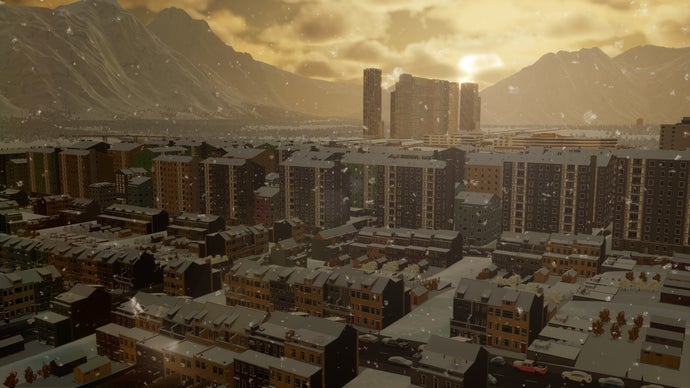
[/p][p]And when winter is coming, and snow is falling, it will now fall onto your lots and their surfaces as well! Since most of the surfaces didn’t show any signs of snow even in the thickest snowstorm, we decided to fix it in a true Finnish fashion; no more clean-cut grass during the wintertime, you will be able to enjoy the snow to the fullest.[/p][p][/p][p][/p][p][/p][p]We have already begun the process of improving other aspects of the environment, like ground textures and how to make them look more realistic, as well as being able to plop trees much closer together and toggling their age. While some of these improvements might not be ready for this first patch, we are hopeful that they will be ready for the next one.[/p][p][/p][h3]Next up[/h3][p]As mentioned at the beginning, we are releasing another City Corner before our first patch, which focuses more on the changes in the mechanics and other future endeavours we have in store for you. In addition to these new aspects of gameplay, we have also prepared fixes to some of the issues you have mentioned in our forums, which we will touch upon in the next post. Until then, let us know what you think about these upcoming visual improvements![/p][p][/p][p]See you soon![/p]