1. Mabinogi
  2. News

Mabinogi News

[COMPLETED] Scheduled Maintenance - February 24th

Mabinogi will have a scheduled maintenance on February 24th. During this time, the game will be unavailable. Maintenance is expected to begin at 5:00 AM PST and last approximately 5 hours.

Please note that the estimated length of time for each maintenance is subject to change without notification.

-Time-

Thursday, February 24th

Pacific (PST, UTC-8): 5:00 AM - 10:00 AM 
Eastern (EST, UTC-5): 8:00 AM - 1:00 PM
Paris (CET, UTC+1): 2:00 PM - 7:00 PM

To address the following:
  • Weekly server upkeep.
  • Windows update.
  • After a long career of being an idol, it is time to retire! The Shining Stage Box sale is ending.
  • Tea and cookies anyone? The Woodland Teatime Basket sale is starting.
  • Processing of requested name changes. Note: The Name Change submission site will be unavailable after 7:00 AM PST time, and will be available after the maintenance.
- The Mabinogi Team

Custom Motion - Patch Notes - February 17th, 2022

Check out all of the details of this month's Patch Notes, featuring the Custom Motion update!

The following Events, Sales, and Promotions are running: Custom Motion
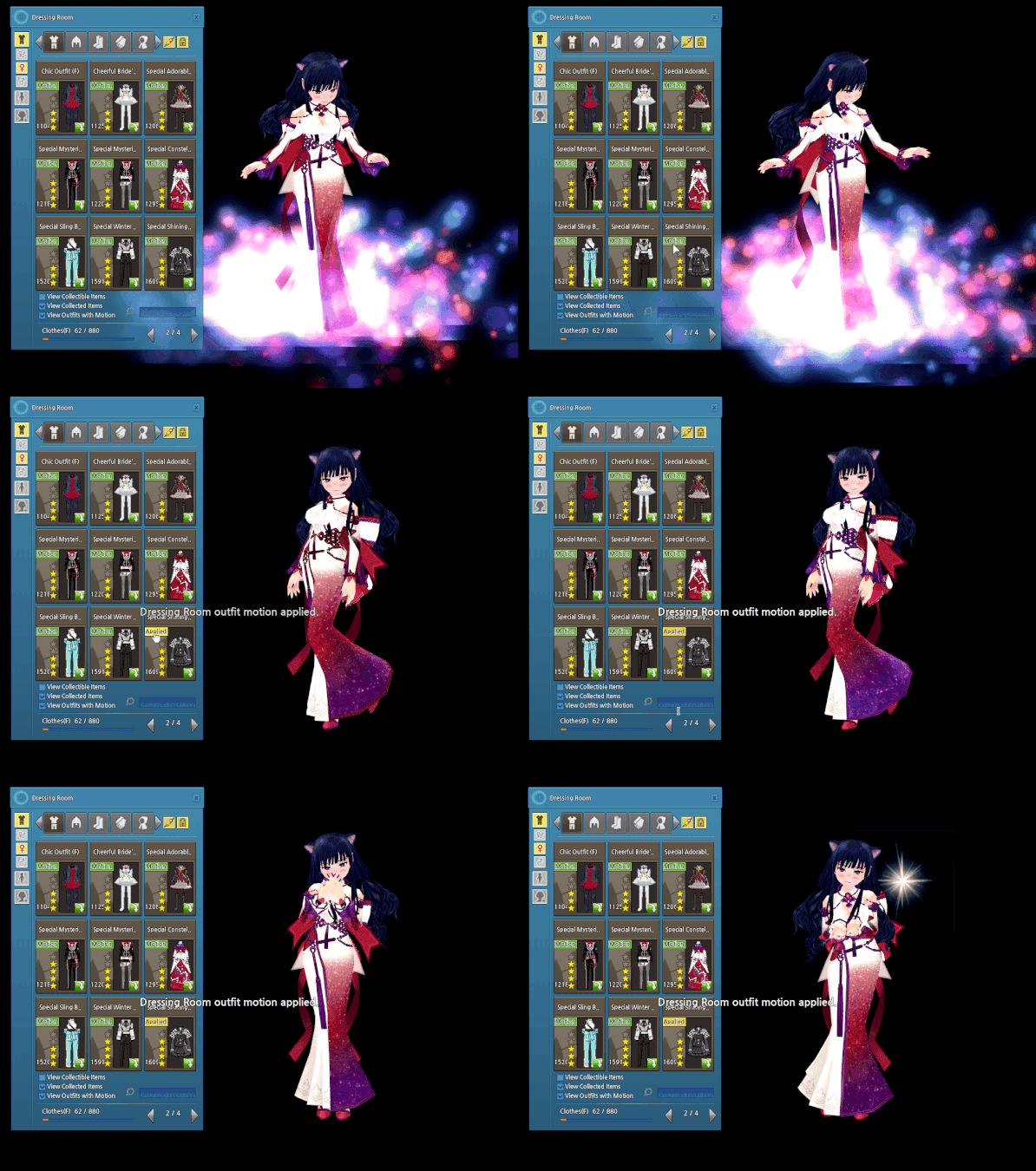
  • You can now swap between custom idle motions of any outfits that have special poses! Read up on the full details on the webpost.
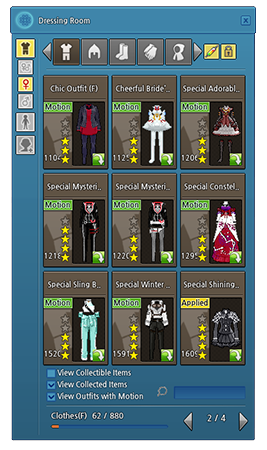
    • The View Outfits with Motion checkbox has been added to the Dressing Room under the Clothing tab.
    • Outfits with motion have been tagged with the green Motion button in the Dressing Room.
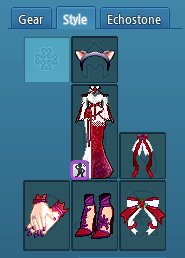
    • When an outfit with custom motion is worn in the Style Tab, a small icon is visible on the inventory image. Clicking on the icon will bring up the Dressing Room with the View Outfits with Motion option selected.
Hand Remodel Update
  • Character hand models have been updated to include separate fingers. 
  • There are certain gloves that cause a graphical issue when worn after this update. These issues will be fixed over time.
Cherry Blossom Rain Event
  • During the event period, February 17th to March 17th, cherry blossom flowers will fall, instead of rain, in the Uladh and Iria regions.
    • If there are weather changes due to the mainstream storyline, the rain will not be affected by the cherry blossom rain.
The following bug fixes have been made to the game:
  • Fixed an issue where incorrect pronouns was used in the quest, "The Dark Beneath the Veil".
  • Fixed a rare occurrence where Completed Glas Ghaibhleann appears to T-pose after the cutscene once defeating it.
  • Fixed an issue of missing dialogue in Gillach's text in the quest, "Ne'er to Linger in the Darkness".
  • Fixed an issue where there was a missing sentence in the item description for the Divine Cinnsealach L2 Dual Guns.
  • Fixed an issue where the Folamh Doll Bag item description incorrectly mentions minerals instead of various ores.
  • Fixed a grammar issue when using the Erg Crystal from the Milletian Full Boost event.
The following are known bugs:
  • There is an issue where you cannot Friend Summon using Fynn Pets. It will show the error, "Unavailable because the owner has opened a Personal Shop".
  • Some players' hotkeys and pet menu settings reset after logging out.
  • During the Kraken Rex boss fight, Kraken Rex will use an attack that will cause players to lose protection, semi-permanently, until they change channels or relog.
  • There is a typo in the Finishing Materials list when crafting the Dustin Silver Knight Greaves.
  • There is a known issue where some players are unable to obtain the G1 quest "Find Goro's Ring".
  • There is an issue where certain G3 cutscenes will not play, but still charge gold.
  • There is an issue where Homestead item information is overlapping.
  • There is an issue where the Today Visitor Count does not reset to 0. When a visiting character visits the Homestead, the Today and Total Count accumulates normally.
  • The available upgrades in the Item Upgrade may overlap in the UI if the window is increased.
  • Homestead Anvils and Furnaces have settings to allow visitors to use them, but do not actually restrict the use of the items.
  • There is a slight graphical error where part of the hose is missing when a William or Butler Partner uses the Water Hose gesture.
  • Some Partner gestures that have them holding a weapon will appear as though the weapon is disconnected and floating.
  • There are Partner gestures that do not activate when a Partner has something equipped in their left hand.
  • There is an issue after using the Thunder skill, the character can't charge Thunder again until after the Thunder bolt hits/damages enemies.
  • If you try to change your style to an appearance already saved in a Beauty Slot, it will say it failed.
  • There is a minor visual issue with the Beauty Slot text if you scroll up and down after expanding the Beauty Slot.
  • The outline color when clicking on an empty Beauty Slot is incorrect.
  • Fine Reforging Tools can still be obtained in the Eweca Orb.
  • There is text cut-off in the Buy Item UI when buying the Royal Society Appreciation Box from Melwyn.
  • The inventory image for the Mace of Mercy is incorrect.
  • Feeding a Pet Instructor Stick to a Level 100 Spirit weapon will cause the character to freeze.
  • If you had a unicode heart on your wedding ring, the heart appears as a question mark.
  • The Shaggy Perm hairstyle can be saved in a Beauty Slot.
  • Cobweb Mummy enemies do not appear in the Alby Advanced Dungeon.
  • Guilds are not appearing in the Guild List.
  • The training methods for Handicraft Rank E are not counted when you make a Fused Erg Sealing Box.
  • When you first open the Master Plan Inventory, it will incorrectly show as locked. Closing and reopening the inventory will fix the issue.

[COMPLETED] Scheduled Maintenance - February 17th

Mabinogi will have a scheduled maintenance on February 17th. During this time, the game will be unavailable. Maintenance is expected to begin at 7:00 AM PST and last approximately 4 hours.

Please note that the estimated length of time for each maintenance is subject to change without notification.

-Time-

Thursday, February 17th

Pacific (PST, UTC-8): 7:00 AM - 11:00 AM 
Eastern (EST, UTC-5): 10:00 AM - 2:00 PM
Paris (CET, UTC+1): 4:00 PM - 8:00 PM

To address the following:
  • Weekly server upkeep.
  • The sound of your heartbeat reminds you of a romantic island paradise...The Doki Doki Island event is starting.
  • Get ready for a free Style Tab Key! The Style Tab Hotday event is starting.
  • Update your fashion sense with the permanent Custom Motion update!
  • Processing of requested name changes. Note: The Name Change submission site will be unavailable after 7:00 AM PST time, and will be available after the maintenance.
- The Mabinogi Team

Custom Motion Update

[h2]Custom Motion[/h2]
You can now swap between custom idle motions of any outfits that have special poses!

  • The View Outfits with Motion checkbox has been added to the Dressing Room -> Clothing tab
  • When this checkbox is checked, only outfits with custom idle motions will be displayed in the Dressing Room.
  • To apply a motion of an outfit in the Dressing Room to your Style Tab, click on the green Motion button next to the desired outfit in the Dressing Room. Once the motion is applied, the button will change to a yellow Applied button.
    • You cannot apply the motion of outfits that you do not own, or that cannot be equipped on your current character.
    • The motion of special collaboration outfits cannot be applied.
  • Once a motion has been applied, it will change the custom idle motion of outfits worn in the Style Tab to the motion of the selected outfit.
    • The motion can only be swapped between outfits that have motion.
    • Only one motion can be applied at a time.
    • Even if you change the clothing equipped in the Style Tab, the applied motion is maintained.
    • Even if there is a motion being applied in the Dressing Room, the motion will not be applied if the outfit you are wearing has no motion, or if the Style Tab has expired.
    • The motion of an outfit will not change if it is equipped in the Gear Tab instead of the Style Tab.
    • If you remove the outfit with the motion that is being applied from the Dressing Room, the motion is turned off.
  • To remove an applied motion, click the Applied button again, or select a different outfit using the Motion button to change to a different motion.
  • When an outfit with motion is worn in the Style Tab, a small icon is visible on the bottom-left corner of the Outfit slot. Click on this icon to bring up the Dressing Room with the View Outfits with Motion option selected.

Milletian Events: Style Tab Hotday!

Does your outfit look a little mismatched? Maybe your Style Tab ran out and now your undyed gear is showing? Never fear, because this event will save the day! Check out the details below.

Event Dates: Thursday, February 17th, After Maintenance - March 3rd, Before Maintenance
[h2]Event Details[/h2]
  • You will receive a Style Tab Key (7 days) by logging in during the event period.
  • Claim the item from the Hotday menu to receive it on your character or choose Claim Later if you want to receive it on another character.
  • The item can be moved between characters through the bank.
  • You can only claim the item once during the event period.