1. 001 Game Creator
  2. News

001 Game Creator News

v2020.007.001 Released (Undo Interface Glitch Fixed)

We've updated 001 Game Creator to v2020.007.001 to address a few immediate issues that were brought to our attention since the last major update last week.

Namely, this version addresses a bug with the Interface Editor which would lock out the toolbar after undoing. You can see the full list of changes below:

  • Fixed disabled toolbar in interface editor after undoing.
  • Fixed typo in Action-RPG demo.
  • Updated example projects to use updated music to improve compatibility with mobile and web.
  • Improved some of the example projects.
  • Fixed Action-RPG/Enhanced-RPG/MMORPG "Hat" sprite and "Staff" item from not layering properly.
  • Fixed Action-RPG/Enhanced-RPG/MMORPG "Male" and "Female" sprites from having incorrect holding points.
  • Fixed sprite connections for Action-RPG, Enhanced RPG and MMORPG templates.
  • Fixed sprite export accessories listing and auto-checked relevant sprites.


For news regarding our latest major update (including the new Action-RPG and Platformer templates, plus the finalised Dark UI) then be sure to check out our major update announcement here: https://steamcommunity.com/games/347400/announcements/detail/2503387602390726169

v2020.007.000 Released! (NEW RPG/Platformer Templates, Finalised Dark UI)

We've updated 001 Game Creator to v2020.007.000 which features completely new and updated Action-RPG and Platformer templates, as well as a finalised version of our Dark UI!

What's New?


Our biggest change with this new update is the complete overhaul of our Action-RPG and Platformer game templates. We've received many questions on our Discord server, and other social networks, about how to do or create certain things in 001, and so we decided to expand upon our original game templates to include the types of features people frequently ask about.

Let's go over some of the changes to each template!

[h2]Action-RPG Template[/h2]

The first thing you'll notice about this updated template is that the previously separate "RPG Demo" has been incorporated into the main template itself (with a bunch of updates of course!) This means that instead of just a single empty "Starting Map", there's actually some substantial content to actually work with right out of the gate!


A new "Story Message" Interface has been added that can be used to inform the player about certain objectives and story elements. These messages have a cinematic look to them and will also auto-close after a set amount of time.


A new Picture-in-Picture Interface has also been added to show the Forest Map when receiving the quest to defeat the slimes that inhabit it.


Numerous tweaks to lighting, weather effects, and other Map elements have also been made to make these areas stand out more and to better showcase 001's feature set.


Two new magic spells (Cure and Fireball) have been added to the player's main arsenal - with accompanying sound effects and sprites. When entering the Forest Map, you'll be given the option to either equip the Cure spell or the Fireball spell.

[h2]Platformer Template[/h2]

The template that's received the biggest overhaul though is the Platformer template. Previously, this template was very barren in content and we've received a lot of questions about this template in particular, so we've given it a much needed spruce up!
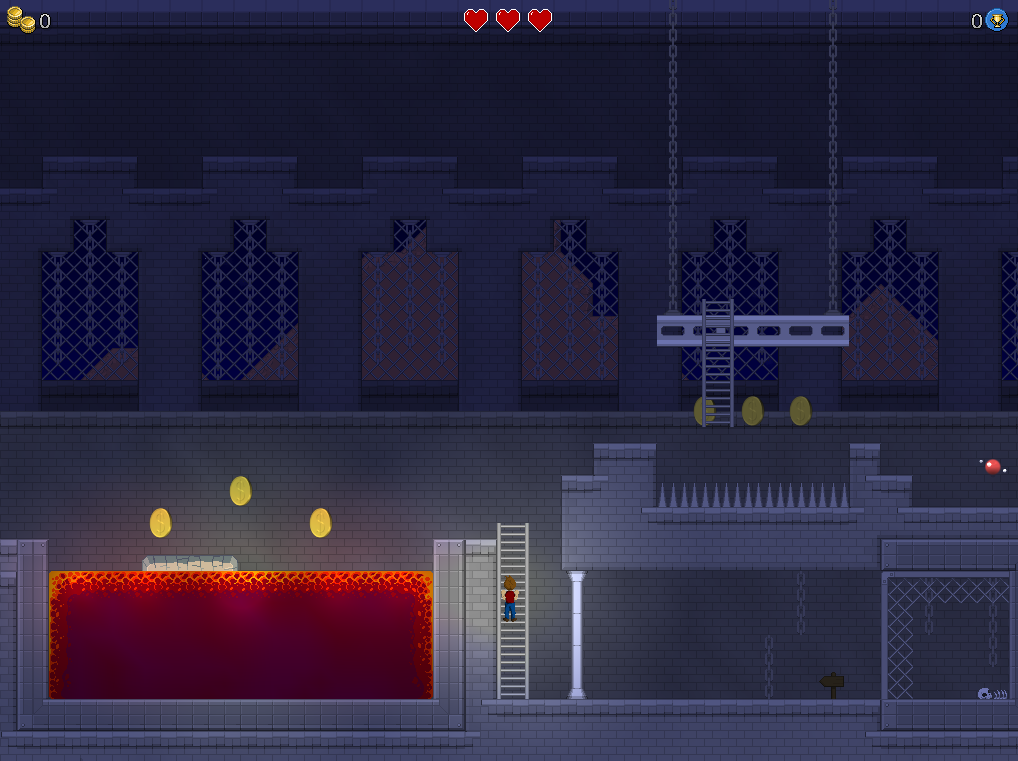

Ladders have been added that the player can climb up/down on to reach higher/lower ledges. There's even a moving ladder (pictured to the right) that the player has to carefully time as to not fall into the deadly spikes beneath!


Moving platforms (utilising an Actor's "Sticky Platform" physics) allow for quick and easy methods of traversal across perilous obstacles, like the lava pit seen here.


Bottomless pits are a staple in any platform game, and we've even added a comical death animation for when the player character loses a life.


Chain-link fences provide an alternative traversal method to ladders - allowing players to move side-to-side instead of just up/down.


Pressure-sensitive platforms activate when the player steps on them, and sink when the player jumps off them. Enemies utilise different Actor Route types to demonstrate how Tile-Based and Direction-Point routes can be used.
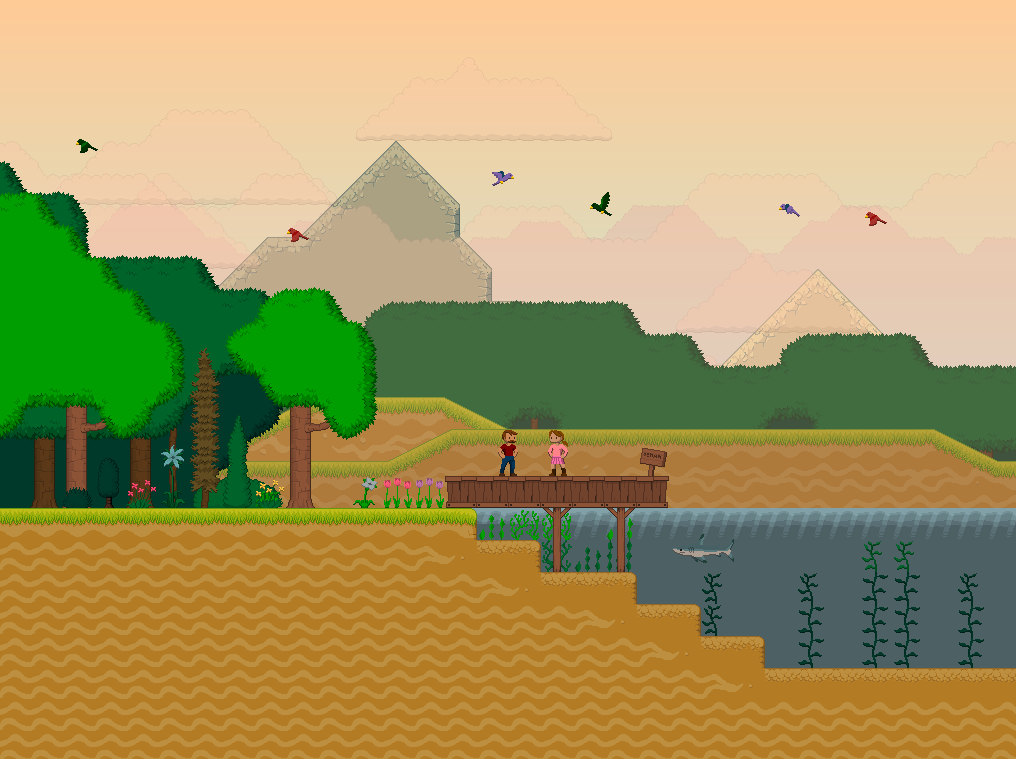

Parallax backgrounds/foregrounds and Map Layers showcase the breadth of visual effects that can be achieved in 001 Game Creator! Can you escape the castle and rescue the princess at the end?

Bug Fixes and Finalised Dark UI


In addition to these newly updated templates, we've also fixed several reported bugs and also finalised our Dark UI - which we released in our last major update. There were a few teething problems that needed to be ironed out but thankfully (with the help of our community) we've managed to resolve all of the outstanding issues with the Dark UI update.

We've also updated all of our music to use the OGG format instead of MIDI for better mobile/web compatibility, as well as improved quality and performance.

Here are just some of the highlights of this release:

  • Fixed "Advanced Message Box" choices from being interpreted as values instead of text.
  • Added "Face Direction of Movement" option to point-based actor routes.
  • Made "Change Facing Direction Based on Movement" event have no effect when an actor is disabled, further preventing actors from being manipulated by input.
  • Fixed "Connection to Accessories" being reset for sprite resources.
  • Fixed new lighting from disappearing for large sprites at edges.
  • Fixed crash when undoing while editing an alternative interface layout.
  • Fixed zone blocking not saving properly sometimes.
  • Fixed taskbar icon disappearing in random cases.
  • Fixed being able to delete inherited actor variables.
  • Added Ladders, Fences, One-Way Platforms and Collectables to template "Platformer".
  • Added new clothing options for "Player Character" in "Platformer" template including new poses.
  • Added new parallax background sprites to the template "Platformer".
  • Added new tile-sets to the template "Platformer" and updated existing ones.
  • Fixed broken accessory connections in the template "Action-RPG".
  • Added "Heal" and "Fireball" magic to the template "Action-RPG".
  • Updated all built-in music to be OGG instead of MIDI.


As per usual, you can see our full list of changes on our change log here:
https://001gamecreator.com/changes/

https://store.steampowered.com/app/347400/001_Game_Creator/

Steam Summer Sale + Windows 7 Tree View Hotfix

It's time for the Steam Summer Sale, and with it come discounts for 001 and its associated DLC Kits! Additionally, we've released a hotfix for 001 to address the Windows 7 tree view list glitch and other reported issues with our latest major update.

Steam Summer Sale


From TODAY until July 9th you can grab 001 Game Creator and its associated DLC Kits for 30% in the Steam Summer Sale!

https://store.steampowered.com/app/347400/001_Game_Creator/
https://store.steampowered.com/app/564680/001_Game_Creator__MMORPG_Kit/
https://store.steampowered.com/app/564681/001_Game_Creator__3D_FPS__Survival_Horror_Kit/
https://store.steampowered.com/app/977250/001_Game_Creator__Enhanced_RPG_TurnBased_Battles/
https://store.steampowered.com/app/1042950/001_Game_Creator__Visual_Novel_Kit/
https://store.steampowered.com/app/567360/001_Game_Creator__Point__Click_Adventure_Kit/
https://store.steampowered.com/app/1144120/001_Game_Creator__Dragons_Den_Resource_Pack/
https://store.steampowered.com/app/951950/001_Game_Creator__Retro_Fantasy_Music_Pack_Volume_1/

New Version (v2020.006.001)


We've also updated 001 Game Creator to v2020.006.001 to address some reported issues with our latest major update last week. This hotfix includes a fix for tree view lists on Windows 7, and a fix for text-based scripting amongst other fixes. See the full list of changes below:

  • Fixed all tree view controls on Windows 7.
  • Improved performance when switching between maps and interfaces.
  • Fixed text-based scripting.
  • Fixed crash when testing on Android with a project folder containing a file without file extension.
  • Fixed incorrect color when using the fill tool in the built-in graphics editor.
  • Fixed crash when attempting to play broken music in the music player.
  • Fixed errors when cancelling the creation of a new tile terraformation neighbour.
  • Fixed crash when placing a pick-up with nothing in it.
  • Fixed being able to edit actor templates indirectly even with the parental control setting set.
  • Fixed not being able to change map/interface hierarchy with names that start the same.
  • Fixed occasional crash when deleting actor templates with ones that inherit from it.
  • Fixed "Separated from Actor" trigger from not always executing.


See our full change log for a list of changes in the last major update, including our new Dark UI and full UNICODE support: https://001gamecreator.com/changes/

NEW Version (Dark UI, Full UNICODE Support)

We've just released a new version of 001 Game Creator featuring the new Dark UI and full UNICODE support that we announced last month!

What's New?


001 Game Creator has been updated to v2020.006.000 and with it comes a bunch of new changes and bug fixes. The two main additions in this release are of course the aforementioned Dark UI and full UNICODE support - which have been highly requested by members of our community for a very long time now. We're glad to finally have these features implemented!

[h2]Dark UI[/h2]

By default, when you start 001 Game Creator, the engine will be in Dark Mode. You can revert back to Light Mode by going into the Tools > Options window. In addition to the new darker theme, we've also changed the main editor font to Verdana to give 001 a more modern appearance, and exposed the graphics used in the Script Editor to allow users to more greatly customise that window!


[h2]Full UNICODE Support[/h2]

At long last, 001 Game Creator now fully supports UNICODE characters throughout the engine! This means that 001 can finally be translated into languages that were once deemed impossible including Russian, Chinese, Japanese and Arabic!


[h3]Translators Wanted[/h3]

With 001 now fully supporting UNICODE characters, this of course means that 001 can now feature languages that it once couldn't, and so we're on the lookout for some volunteers who are willing to help us translate 001 into new languages. Specifically we're looking for translators for Russian, Chinese, Japanese and Arabic. If this is something you feel you can help with then please apply using our translator's contact form: https://001gamecreator.com/translation/

Bug Fixes


With any new release, there are of course a bunch of bug fixes (including several Map Construction crash fixes). As always, you can view the full change log on our website: https://001gamecreator.com/changes/ but we wanted to highlight some of the more significant changes here:

  • Fixed large scaled actors from disappearing on the edges of the screen.
  • Fixed tile-set editor's collision and material editors from not having complete focus.
  • Fixed crash when using "Simulated Control" use value under "Main Party / Game".
  • Fixed crash when map's fog distance end is too low.
  • Fixed crash when changing actor template while a trigger is running.
  • Fixed "Face Direction of Actor" actor event.
  • Fixed y-axis version of "Face Direction of Location" actor event.
  • Fixed crash when attempting to edit a collection or table that contains a nested collection.
  • Fixed not calling custom events that had "main", "relate" or "this" as its last or only argument.
  • Fixed local help file not being displayed sometimes.
  • Fixed crash when opening a custom event that has a parameter changed to a text/branch cluster.
  • Fixed font editor freezing computer with large UNICODE blocks.
  • Fixed not being able to uncheck "CJK Unified Ideographs (All)" in font editor.
  • Fixed "not returning value" custom event errors from highlighting incorrect node in script debugger.
  • Fixed script debugger from highlighting incorrect node when stepping through loop iterations.
  • Fixed crash when quickly switching between maps and interfaces.
  • Fixed not being able to get cursor positions from secondary screen touches on Android/iOS.
  • Fixed certain crashes when windows were not being properly forced in front.
  • Fixed Steam not shutting down software properly after having done any Android builds.
  • Fixed Android/iOS testing app from crashing after first game tested.
  • Fixed Android screen orientation change issues.


Community Guides

Lastly, we wanted to take this opportunity to remind users of our user-created Steam Guides: https://steamcommunity.com/app/347400/guides/ which provides an extra source of learning material in addition to our video tutorials, online wiki and built-in demos/examples.

Some of our legacy tutorials (that were originally removed from the engine for being outdated) are currently being revised and will be posted to our Steam Guides section in the coming days, so be sure to check them out once they're posted!

Big Things Are Coming To 001 Game Creator + May Sale

We've got some juicy news to share with you about what's coming to 001 Game Creator very soon, as well as a fortnight-long May sale!

May Sale

From Today until Friday 15th May you can get 001 Game Creator, and its associated DLC Kits, for 30% off! Unlike our usual week-long sales, this one is a fortnight-long so you have a longer chance to grab 001 while its on offer!

https://store.steampowered.com/app/347400/001_Game_Creator/
https://store.steampowered.com/app/564680/001_Game_Creator__MMORPG_Kit/
https://store.steampowered.com/app/564681/001_Game_Creator__3D_FPS__Survival_Horror_Kit/
https://store.steampowered.com/app/977250/001_Game_Creator__Enhanced_RPG_TurnBased_Battles/
https://store.steampowered.com/app/1042950/001_Game_Creator__Visual_Novel_Kit/
https://store.steampowered.com/app/567360/001_Game_Creator__Point__Click_Adventure_Kit/
https://store.steampowered.com/app/1144120/001_Game_Creator__Dragons_Den_Resource_Pack/
https://store.steampowered.com/app/951950/001_Game_Creator__Retro_Fantasy_Music_Pack_Volume_1/

Next Version (coming very soon!)

OK, let's get to the meat of this announcement by talking about what we have coming in the next version (which we aim to have out in the coming days). We've made some pretty substantial changes to v2020.004.000 and as such, we need more time to fully test it in order to ensure everything is working as intended. We'll be making another announcement soon, once the update goes live!

[h3]Full UNICODE Support[/h3]
We implemented partial UNICODE support last year but there were still many parts of the engine that couldn't properly display UNICODE characters, which meant that 001 couldn't be fully translated into languages like Russian or Chinese. However, with v2020.004.000 we can finally support these characters throughout the 001 editor. This required a huge amount of work, as we needed to create entirely new UNICODE-compatible controls and then update every window in the engine to make use of them.


[h3]Dark UI[/h3]
Something else that's been hotly requested is also finally being implemented. We began with some early tests last year however we've finally managed to complete our Dark UI (which has had quite the dramatic overhaul from that very first teaser image we showed). By default Dark UI will be enabled but you can revert back to classic 001 within the Options window. Additionally, we've updated the main font to Verdana - giving the engine a slightly more modern look.


Keep an eye out over the coming days for our update announcement!