1. Rec Room
  2. News

Rec Room News

Rec Room UPDATE - the "Say Cheese" edition

[h2]Share Camera Update[/h2]
The Share Camera enters the digital age!
  • New widescreen design with a flashy (badum, tish) built-in menu
  • Learn the art of photography with composition guides to line up shots fit for a printed photo, profile picture, or any composition you are going for. Comes in fun shapes like Square, Circle, and Grid... which is totally a shape.
  • Zoom! Go up to 2x or out to 0.5x to fit all your friends in the shot and get artistic with it
  • More Timer options and on-preview countdown
  • Selfie preview is like looking in a mirror, it finally makes sense! (if you somehow prefer the old way, the option's still there)
  • In Tripod mode, the menu shows on both sides of the camera. No more setting up a shot and realizing it's facing the wrong way!
  • Higher preview resolution and framerate (dependent on device and graphics settings)
  • Removed watermarks when sharing natively. Just clean, pristine, HD photos.
  • You can print a photo, then share it. Or share it, then print it. Set your profile pic while you're at it. Order does not matter!
  • Automatically smile when looking at your camera, or your friend's! (find the option in the Share Camera's settings)

Screen players have a new way of using the Share Camera with lots of new expressive and creative capabilities!
  • Hold the camera up like you are taking a real photo
  • A perfectly accurate preview of what will be in the shot, no more guessing and checking.
  • In Selfie mode, aim to adjust your position in the frame. Aim past the edges to continue rotating. There are a few control settings for selfies so you can find what feels best to you.
  • For Mouse and Gamepad, the usual tool menu button switches between aiming the camera and using a cursor on the built-in screen
  • And yes, all the above features (new and old) work on Screens too!

[h2]Maker Pen Menus[/h2]
  • The tear-off menus now remember where you set them relative to your player and your preferred size.
  • They're also now 20% off! (they spawn a fifth smaller than they did previously) ;D Adjust the menu size using the option provided in the top bar of each of these menus.
  • In VR, the Maker Pen detached menu is now resizable!
  • We've also set up some experiments to test out different Maker Pen tool button layouts and colors. So there's a chance you'll see different versions of the tool menu over the next couple of weeks.
[h2]General Improvements and Bug Fixes[/h2]
  • Polished the report, messaging, and mute buttons in the new player profile
  • Small moves using the plane handle are now possible!
  • Avatars no longer looks crazy when looking at a Set Game State Chip.
  • Fixed an issue where opening the people page while changing rooms could break player locomotion.

Please see here for convenient links to controls, tutorials, comfort options, etc.:https://recroom.com/communityWe love to hear your feedback, so please don't hesitate to let us know what you think.
Rec Room PATCH - the "New Profile, Who Dis?" edition


Some improvements and bug fixes this week, but we're feeling particularly whimsical about them...

- We've added color, material, interaction volumes
- Now mods with new profiles can ban inside rooms
- Jittering tools and post-Royale beeping
- Trucks can be reddened; sliders no longer creeping
- Its a smattering of bugs and fixes labor-ial
- Also some folks might get new tutorials?


And now back to the notes!
[h2]General Improvements and Bug Fixes[/h2]
  • Friends who are new to Rec Room may start to see some additional tutorials for game basics like changing outfits, exploring the Play menu and using your camera. It's a fantastic time to start playing! Some players will receive special rewards for completing these challenges. Other players will have a path to earn the same rewards in the future.
  • Coach's ever-changing avatar is no longer visible on their profile page. Let them have some privacy!
  • The Select tool now has more convenient shortcuts to copy and paste functionality. These new buttons let you Copy a selection, Paste your most recently copied item, and shortcut to the Clipboard menu in the Palette. You can find the Copy, Paste Recent, and Clipboard buttons in the Select Tool Functions foldout. Keep an eye out for more Functions in the future!
  • Players can now reset prop material and color changes to default values from the config menu.
  • Added Color and Material support for more UGC buttons.
  • Configured text will now show up on touch buttons for interaction volumes.
  • Increased screen players interact distance to be more in-line with other platforms.
  • Fixed adjusting sliders and drag scrolling inconsistencies depending on the direction the UI is facing. Let us know how this feels!
  • Fixed a bug where room moderators with the new player profile couldn't give room bans to players.
  • Fixed the endless beeping sounds after a Rec Royale game when a player's Rec Royale XP bar is between 90-94.99% full and the player gains exactly 5% XP. We know, we're as surprised as you are about this one.
  • Fixed a bug where certain UGC props such as the Pickup Truck prop could not be recolored to red. Although we still prefer an Orange one!
  • Fixed the jittering on tools preview and actions while moving.

Please see here for convenient links to controls, tutorials, comfort options, etc.: https://recroom.com/communityWe love to hear your feedback, so please don't hesitate to let us know what you think.

Rec Room PATCH - the "New Profile, Who Dis?" edition

[h2]New Social Interactions for VR[/h2]
Quickly opening player profiles and quick accept for notifications is coming to VR!
  • Open players' profiles by pointing in their direction and holding the menu button.
  • Hold the menu button for notifications like friend requests, invites, etc. to instantly accept them. No more searching for the notification in your watch while your friend's team fills up in the next room!
  • Holding the menu button will otherwise open the Watch menu.

Along with notification quick accept and opening profiles,
  • Nametags are no longer a clickable button! Now you can point at the scoreboard past the crowd surrounding it.
  • Pointing is unchanged (in case you were worried about that).
  • You can choose which hand is used for Emotes (a.k.a Expresso) in the settings, and the other hand will be used for these new menu button features (this is needed on Steam VR which cannot use the dedicated menu button on the controller). Hopefully you can learn which hand is which before you start accidentally grimacing at people and making them feel awkward.
[h2]VR Touch UI Interaction Improvements[/h2]
  • VR Players should now find it much easier to physically interact with RRUI menus by touching them with their fingers! We've heard your feedback that the new UI is difficult to interact with for players who prefer pressing buttons physically in VR instead of using the laser pointer, and we are doing our best to try and address that.
  • VR players will no longer scroll by physically dragging the background of an RRUI menu with their finger, since that made buttons very hard to press. You may still drag the background to scroll while laser pointing, and you may still physically drag the actual scrollbar.
  • VR players should find it easier to hit tiny RRUI buttons with their fingers, as we've added some leeway in terms of where you both start and end your button press. We also briefly considered making your hands a realistic size, but where's the fun in that?
  • Added a setting for VR players that makes physical RRUI button clicking quicker by removing the ability to cancel button presses. If you want to live dangerously, well, now you can!
  • Added a setting for disabling/enabling the cursor & grid that show up when physically interacting with an RRUI menu in VR.
  • These new VR settings can be found in the Experience tab of the settings menu.
  • We've also improved the sound effects for RRUI button pushing to make the buttons feel more physical.
[h2]General Improvements and Bug Fixes[/h2]
  • Now you can enter emojis in Rec Room chat on all platforms! Use the emoji picker button on chat input fields to show an emoji picker dialog. Not sure if emojis are supported in the ship notes, let's find out!
  • In response to community feedback, we're rolling out improved UI features for limited-time items to make it easier to see when the item will be available until, as well as other consumer sales information. Catch that next cool thing before it disappears before you knew it existed!
  • Invisible Collision volumes can now be configured for whether or not they prevent interactions with objects on the other side of one. This can be done via the Block Interactions toggle in its Configuration menu. By default this value is ON, except for on Invisible Collisions already saved into rooms before this change.
  • Fix: Object Respawner gadget no longer blocks interactions with objects inside it.
  • Fix: Screen and Touch players can now interact with the candles on Celebration Cakes again. Take this opportunity to celebrate your birthdays, anniversaries, and other milestones again!
  • Fixed a crash with the iOS Pencil.
  • Fixed a bug where trying to create a room with an existing name could prevent creating any rooms until moving to a new room.
  • Fixed the pointing finger being able to block dodgeballs and paintballs... until the next time the Forbidden One sneaks it back in.
  • Fix for tube points snapping. Creating and moving points now agree on how to snap. Create order out of chaos!
  • Adding a toggle in the Maker Pen General Settings to allow UI interactions with the hand holding your Maker Pen, for when you just don't have enough hands.
  • Fixed bug with the new portrait chat UI that was preventing players from reaching the title screen if they launched the game from a chat notification. We just really wanted you to try out the chat! Forever!

Please see here for convenient links to controls, tutorials, comfort options, etc.: https://recroom.com/communityWe love to hear your feedback, so please don't hesitate to let us know what you think.

Rec Room PATCH - the "Maker Pen Makeover" edition

[h2]General Improvements and Bug Fixes[/h2]
  • Fixed some settings not getting properly saved if you updated a single setting to multiple values quickly enough or scrolled a slider quickly enough.
  • Fixed a bug where setting mouse and touch sensitivity would sometimes only set horizontal or vertical sensitivity. As much fun as it is to scroll super slow horizontally and super fast vertically, it probably made some people sick.

Please see here for convenient links to controls, tutorials, comfort options, etc.: https://recroom.com/communityWe love to hear your feedback, so please don't hesitate to let us know what you think.

Rec Room UPDATE - the "Maker Pen Makeover" edition

[h2]New Maker Pen Menu[/h2]
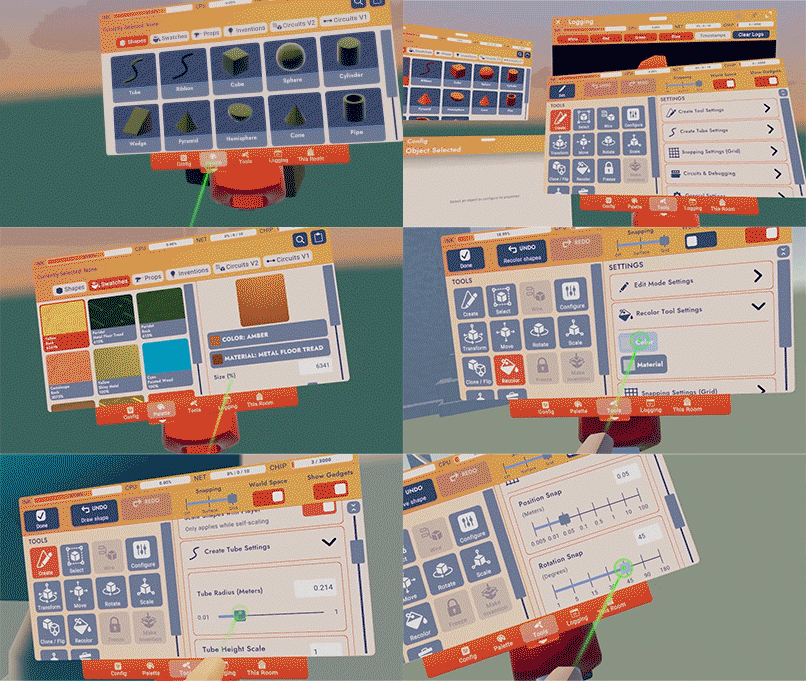
  • We have reorganized some of the tools based on creator feedback. The new menu was created to have a better flow, as well as to prepare for future changes that the wire tool will be undergoing and to give the menu room for future tools without the need to create a whole new menu.
  • Try the Navigation Bar at the bottom of the menu for quick and easy navigation on all platforms.
  • Contextual Settings surface settings for currently selected tools for quick and easy access without the need to hunt for the settings you need.
  • Color and material selections now include swatches that you can save and use in multiple rooms.
  • Logging Screen can now be detached from the Maker Pen so you can heat test and debug without having the Maker Pen in your hand!
  • New search allows you to search everything in the palette, and you can also view more information about each card. This makes it a lot easier to view details about your inventions and make quick changes to the details pages.
  • We added more ways to search for your inventions! We added the following categories: Store Inventions, All Inventions, My Inventions, Published Inventions, Downloaded Inventions, and Certified Inventions if you have them.
  • "This Room" can now be reached from the Maker Pen navigation bar! Big time saver!
  • Tearoff tabs let you position the pages of your maker pen around your space as you see fit
  • The new Transform Tool lets you move, rotate, and scale without changing tools.
  • The default shape you are given when equipping your Maker Pen is now different per platform: Tube for VR and Cube for all the other platforms.
  • Add a new setting to Maker Pen settings UI that allows to switch between Scale and Move mode when creating new shapes with Maker Pen.

[h2]General Improvements and Bug Fixes[/h2]
  • New UI Sliders are now easier to grab. No more accidentally scrolling while trying to adjust settings sliders, and no more accidentally adjusting sliders when trying to scroll!
  • Added the Code of Conduct posters to the \^Lounge and \^Park.
  • Community Board videos will stop being so scared that they freeze, we comforted them and they'll play normally again.
  • Players can no longer fling away objects in front of them when taking a Seat in Screens mode.
  • When using a Gamepad and Keyboard, you can hold the menu button while looking at a player to easily open their profile, instead of clicking on their nametag.
  • We've hidden the Subscribe button in the Invention details page for your inventions...we figure you're already pretty invested.
  • Pike Goblins kept slipping on ice in custom rooms, making them super fast. So, we took a blowtorch and melted the ice. No more speedy scary goblins.
  • Players will experience less jittery movements on moving platforms, though you may still experience some jittery movement when other players are on the same platform.

Please see here for convenient links to controls, tutorials, comfort options, etc.: https://recroom.com/communityWe love to hear your feedback, so please don't hesitate to let us know what you think.