1. Eleven Table Tennis
  2. News

Eleven Table Tennis News

Big updates incoming and arrived if you are on beta

Hi All!

We've been hard at work grinding down bug after bug reported to us by the very active community we have on the discord (https://discord.gg/s8EbXWG)

This update is applicable to the beta (now will be public), and the version on Oculus Home. There are some minor issues with the AI and paddle collision sometimes, and we are working hard to fix that so we can release to the wide steam audience.

Updates:
The huge cross multiplayer update system was released to a smaller audience and Oculus home users, and it was a hit and miss with the connectivity. We have sharpened all of the code and it should be all hits from now on.
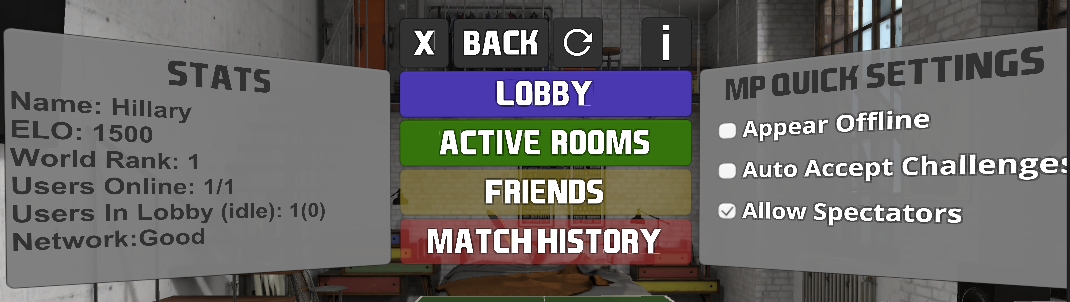


Friends and Match history are still in the works, but a new button has appeared. "Active Rooms". Clicking it, will bring you into a view where you can see the matches that are active, who is playing them, and even, if applicable to the type of match, and to the preferences of the main 2 players, spectate.

That's right SPECTATE.

Not only can you look around and watch a game, but while the two main players haven't selected the mode to start the game in, everyone has the ability to grab the ball and hit around - so you can have informal 2 on 2, or 4 on 4..or really whatever you want to do.
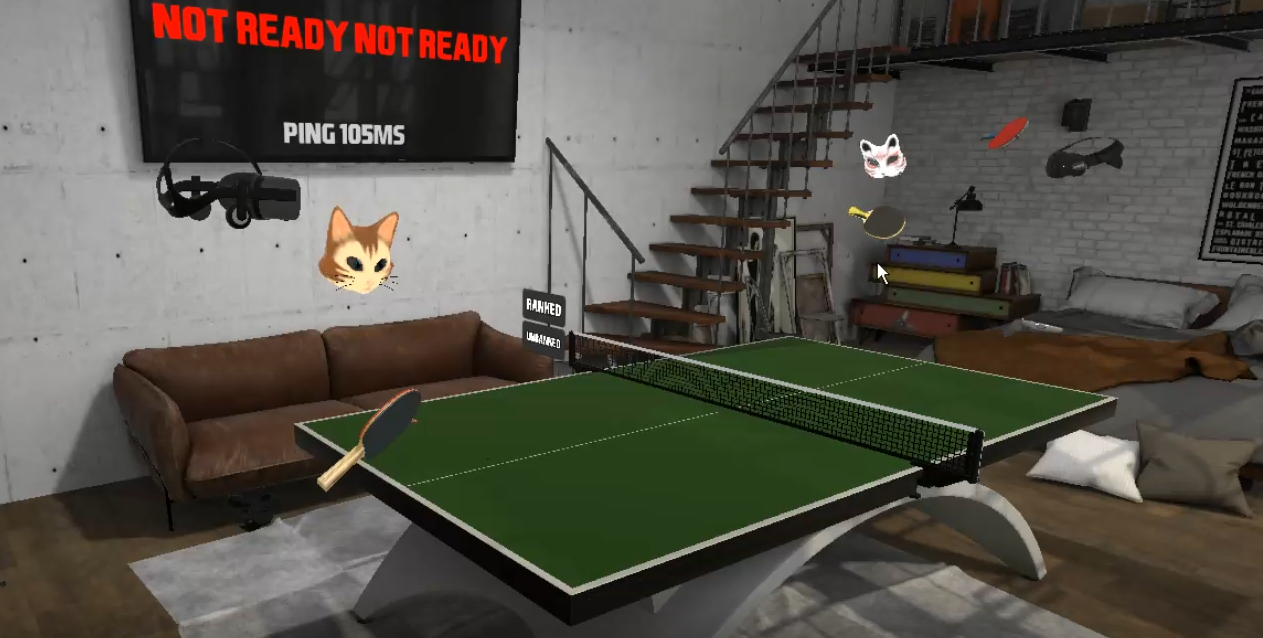


While in the room, there is a new button "ROOM" which lets you see who are the people in the room. Each person has their own row, and anyone can hide or control the volume of any other person. The main two players (host and challenger) additionally have the ability to kick out a spectator. Once the actual game starts, spectators lose the ability to hit or grab the ball. (eventually we'll have legit doubles)


There is also a new area which tells you and everyone else in the room what the score is. MP games are now all best of 3.


Another update is that when you play MP now, you will see the head paddle and controller models exactly as your opponent is using - and default headset models are the actual headset models (thanks HTC for providing one for the Vive). Gradually we'll add a headset model for every headset to everyone can be represented :)


Speaking of headsets, you can now set the headset of the AI.

Mini games have a leaderboard and save score, and finally after the long wait, we now have ranked matches!

Currently it is basic ELO with everyone starting at 1500, but we'll probably tweak as time goes by and we tune the rates.


Many people have been missing invitations because the FOV isn't human vision width yet - so the notification panel will have a beep associated with it that should get everyone's attention.

As always, if you have any issues, what so ever, please reach out to us.
We can be reached on the discord (best), or email at [email protected] (medium), or just somewhere here on the forum (ok).

----

So many updates are on the horizon, come join the discord to get the latest scoop!


--PS, i forgot to press the button, so after this post, about 5-10 minutes the beta wasn't available, now it is.

PS2: forgot to say. There is a new button on the main menu. It's just a question mark, but reveals a view that has buttons that opens up links to an FAQ, or contact info, or a discord invite.

PS3: fixed lan plan

Update: rolled out a fix to remove the AI from an MP match if you get challenged mid AI match.

Big updates incoming and arrived if you are on beta

Hi All!

We've been hard at work grinding down bug after bug reported to us by the very active community we have on the discord (https://discord.gg/s8EbXWG)

This update is applicable to the beta (now will be public), and the version on Oculus Home. There are some minor issues with the AI and paddle collision sometimes, and we are working hard to fix that so we can release to the wide steam audience.

Updates:
The huge cross multiplayer update system was released to a smaller audience and Oculus home users, and it was a hit and miss with the connectivity. We have sharpened all of the code and it should be all hits from now on.


Friends and Match history are still in the works, but a new button has appeared. "Active Rooms". Clicking it, will bring you into a view where you can see the matches that are active, who is playing them, and even, if applicable to the type of match, and to the preferences of the main 2 players, spectate.

That's right SPECTATE.

Not only can you look around and watch a game, but while the two main players haven't selected the mode to start the game in, everyone has the ability to grab the ball and hit around - so you can have informal 2 on 2, or 4 on 4..or really whatever you want to do.


While in the room, there is a new button "ROOM" which lets you see who are the people in the room. Each person has their own row, and anyone can hide or control the volume of any other person. The main two players (host and challenger) additionally have the ability to kick out a spectator. Once the actual game starts, spectators lose the ability to hit or grab the ball. (eventually we'll have legit doubles)


There is also a new area which tells you and everyone else in the room what the score is. MP games are now all best of 3.


Another update is that when you play MP now, you will see the head paddle and controller models exactly as your opponent is using - and default headset models are the actual headset models (thanks HTC for providing one for the Vive). Gradually we'll add a headset model for every headset to everyone can be represented :)


Speaking of headsets, you can now set the headset of the AI.

Mini games have a leaderboard and save score, and finally after the long wait, we now have ranked matches!

Currently it is basic ELO with everyone starting at 1500, but we'll probably tweak as time goes by and we tune the rates.


Many people have been missing invitations because the FOV isn't human vision width yet - so the notification panel will have a beep associated with it that should get everyone's attention.

As always, if you have any issues, what so ever, please reach out to us.
We can be reached on the discord (best), or email at [email protected] (medium), or just somewhere here on the forum (ok).

----

So many updates are on the horizon, come join the discord to get the latest scoop!


--PS, i forgot to press the button, so after this post, about 5-10 minutes the beta wasn't available, now it is.

PS2: forgot to say. There is a new button on the main menu. It's just a question mark, but reveals a view that has buttons that opens up links to an FAQ, or contact info, or a discord invite.

PS3: fixed lan plan

Update: rolled out a fix to remove the AI from an MP match if you get challenged mid AI match.

HTC Tracker Compatibility Update, and beta status, and more...

Hello Everyone,

For those of you who have joined our discord and especially those who have participated in the recent tournament, thank you very much for your time and effort.

You can find us on the discord chat almost any time and we answer questions, discuss various topics, and share the occasional cat picture.

Eleven Discord

As many of you may have heard, HTC has announced their tracker peripherals yesterday.

HTC Vive Tracker

They have been kind enough to send us a paddle peripheral in advance so that we can make sure we support their product. They are very open to input from us and we even exchanged 3d model files so that we can make some suggestions on how to improve it for the next version.

Anyway, without further ado, today's patch is about supporting this paddle peripheral.

To use it, turn on the game as you would normally. Make sure both vive controllers are on and the tracker is off. Then turn on the tracker, and select YES from the prompt that pops up in your headset. It may also work if you start all 3 at once with the Vive, but there are certain timings where it doesn't work very well. Do it this way, and you should have no issues.

Here is a 2 sided video of me demonstrating this. Pardon the cute kitten digging her claws into my leg...

Eleven: Table Tennis VR: ViveTrackerUpdate

There are some small issues that arise if you try to switch back to using a vive controller. Also, to make it easier, when the tracker is being used, the left-hand switch is disabled. There may be other small issues, but they are pretty lower importance compared to the important stuff (gameplay, multiplayer, replays).
That being said, we have not tested this with an externalCamera set up (for mixed reality). If there is any reason you need to drop to the previous update, please choose it in the betas tab in the properties window of the game (from the steam library view). The beta for this is "master-minus-tracker-11-17-2017"

When viewing replays, you'd still need to use the Vive controllers for full navigation.

---------

short story: this update changes nothing at all except for Vive tracker compatibility.

---------

Future update status:
We've been working super hard to revamp the code and bring the game to more users. We have opened up beta sign up for the Oculus Home. Multiplayer will be crossplatform. Today I heard that someone was able to play Eleven on an Microsoft Acer headset. So exciting to see the user base and device base grow. The latest multiplayer code results in much faster connections, less issues with lag, and much better voice latency. The latest game code improves paddle friction mechanics, and cuts paddle-ball collision detection by 1 frame. We are actively working on this every day, so join us on the discord to get a chance to see every step of progress we make!


HTC Tracker Compatibility Update, and beta status, and more...

Hello Everyone,

For those of you who have joined our discord and especially those who have participated in the recent tournament, thank you very much for your time and effort.

You can find us on the discord chat almost any time and we answer questions, discuss various topics, and share the occasional cat picture.

Eleven Discord

As many of you may have heard, HTC has announced their tracker peripherals yesterday.

HTC Vive Tracker

They have been kind enough to send us a paddle peripheral in advance so that we can make sure we support their product. They are very open to input from us and we even exchanged 3d model files so that we can make some suggestions on how to improve it for the next version.

Anyway, without further ado, today's patch is about supporting this paddle peripheral.

To use it, turn on the game as you would normally. Make sure both vive controllers are on and the tracker is off. Then turn on the tracker, and select YES from the prompt that pops up in your headset. It may also work if you start all 3 at once with the Vive, but there are certain timings where it doesn't work very well. Do it this way, and you should have no issues.

Here is a 2 sided video of me demonstrating this. Pardon the cute kitten digging her claws into my leg...

Eleven: Table Tennis VR: ViveTrackerUpdate

There are some small issues that arise if you try to switch back to using a vive controller. Also, to make it easier, when the tracker is being used, the left-hand switch is disabled. There may be other small issues, but they are pretty lower importance compared to the important stuff (gameplay, multiplayer, replays).
That being said, we have not tested this with an externalCamera set up (for mixed reality). If there is any reason you need to drop to the previous update, please choose it in the betas tab in the properties window of the game (from the steam library view). The beta for this is "master-minus-tracker-11-17-2017"

When viewing replays, you'd still need to use the Vive controllers for full navigation.

---------

short story: this update changes nothing at all except for Vive tracker compatibility.

---------

Future update status:
We've been working super hard to revamp the code and bring the game to more users. We have opened up beta sign up for the Oculus Home. Multiplayer will be crossplatform. Today I heard that someone was able to play Eleven on an Microsoft Acer headset. So exciting to see the user base and device base grow. The latest multiplayer code results in much faster connections, less issues with lag, and much better voice latency. The latest game code improves paddle friction mechanics, and cuts paddle-ball collision detection by 1 frame. We are actively working on this every day, so join us on the discord to get a chance to see every step of progress we make!


Lighting, Shadows, Sliders, Colors

Some updates because people mentioned issues with visibility or color changes


  • Lighting: lighting has been improved on levels where needed. These were surface changes and more will probably come in the future.
  • Shadows: changes have been made to the shadow options that makes shadows more prominent and appear on lower settings as well. A few people have tested on the beta and have said that they had no issues with the graphics. If you do, please let us know, and we'll probably add shadow level sliders somewhere. The pointer laser shadow has been removed, because lasers don't leave shadows :)
  • Sliders: All (oops, missed the new brightness one), sliders now display their value in place of the label while moving them around. So, if you are discussing your set up with someone, you can use more exact values. Additionally, the super sampling slider now only makes the change on release of the slider since it was causing severe frame skipping during the change.
  • Colors: a few people have made various comments regarding the color choices or visibility of ball/table. In place of the grey ball option, and the pink table option, we have added a custom color option.


New custom color menu options:


Color picker:


Slider value display: