1. Satisfactory
  2. News

Satisfactory News

1.1 Fixes v1.1.1.7

Hi Pioneers!

Hello again (hehe) everyone, We have been quite busy with the Console release for Satisfactory which if you weren’t aware is now out on PS5 and Xbox!

If you haven’t seen it, You can check out our release trailer for it below
https://youtu.be/AcutI-YOLg4

At the same time we’ve been preparing some goodies for PC as well, so rest assured

This patch has a few important things in it, We feel that the Spline Collision refactor can finally leave Experimental since it’s showed to be stable overall, on top of this, we have an assortment of fixes and improvements for Steam Deck which should hopefully finally push us to have the verified status :) as well as a few extra bug fixes.

If you happen to encounter any issues from this patch please let us know over at our QA Site https://questions.satisfactorygame.com/ We read your feedback every day

Thank you for your continued support and see you all again soon
OPTIMIZATION
  • Refactored Spline Collision
    • This affects Conveyor Belts, Pipelines and Hypertubes and should lead to RAM usage improvements in big saves


STEAM DECK
  • First time experience improvements
    • Improved font size and UI scaling defaults across the board
    • Added new values for the default graphical presets for Steam Deck only (Quality and Performance modes are available similar to console, with values you can tweak manually if preferred as well)
  • Changed confirm button to X on the Server Manager menu to avoid soft locks when inputting text using the Virtual Keyboard on Steam Deck


BUG FIXES
  • Fixed visual flickering in the sky around Northern Forest during nighttime
  • Fixed issues when saving a game with a custom name on Steam Deck
  • Fixed Conveyor Belt Item Frequency and Conveyor Belt Render Distance options not working properly in Options menu > Video

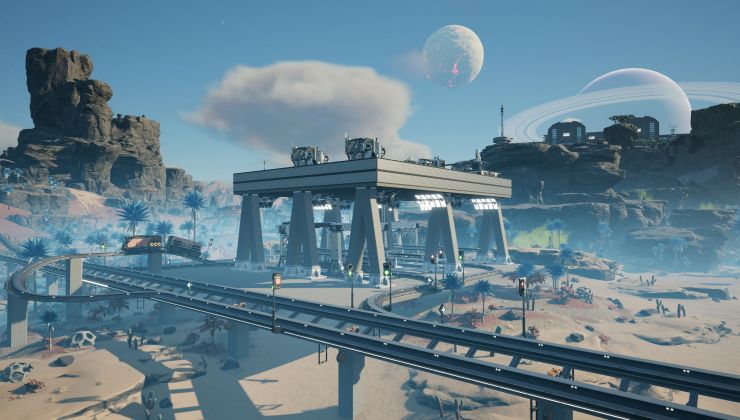
Satisfactory 1.2 will add the "perfect solution" for transporting fluids, but it's probably not what you were asking for

Satisfactory 1.2 is real, and developer Coffee Stain Studios has some good news for players, although it might not be what you were expecting to hear. We've recently passed the one-year anniversary of Satisfactory's full launch, and it's constructed itself a secure seat among the best building games on PC. With its console launch just around the corner, the studio is turning its attention to the next major Satisfactory update, and there's some great news for anyone who's finding their base a little too strenuous for their PC.


Read the rest of the story...


RELATED LINKS:

Best Satisfactory mods 2025

Satisfactory is at its lowest price since its full launch, so grab it quick

After months of testing, Satisfactory 1.1 brings new buildings, better travel

Improved Steam Deck support is coming to Satisfactory

Satisfactory recently had a fresh experimental Beta for testing, which includes improvements to how it works on Valve's Steam Deck.

Read the full article here: https://www.gamingonlinux.com/2025/10/improved-steam-deck-support-is-coming-to-satisfactory/

EXPERIMENTAL Update v1.1.1.6

Hi Pioneers!

Today’s patch is a small hotfix to the freezes that were present when interacting with the UI when playing from the Epic Games Launcher version of the game

If you have never tried the Experimental version before but would like to try it now try the following

From Steam:
  • Right click the game in Library > Properties > Betas > Select Experimental and start downloading
From Epic Games Launcher:
  • Locate “Satisfactory Experimental” in your library and install

As usual, if we introduced any new issues with this patch please let us know over at our QA Site https://questions.satisfactorygame.com/ We always appreciate your feedback and posts :)

Since the patch is still very recent, the previous patch notes will be included with this post so no one misses the information

Thank you all for your feedback so far and see you again soon
BUG FIXES
  • Fixed performance issues when opening the UI while playing from Epic Games Launcher
TECH ART
  • Fixed visual flickering around Northern Forest during nighttime


Previous Patch Notes Below:

Hi Pioneers!

Hello everyone, Today we’re reopening experimental with several changes, but the most important one of them is an optimization we’ve done a refactor of how we handle Spline Collision in-game, so now Conveyor Belts, Pipelines and Hypertubes should only have collision when a player is near them, this should also result in memory optimizations for bigger saves that use a lot of them.

This could potentially have unintended effects in both Singleplayer and Multiplayer/Dedicated Server so we wanted to release this in Experimental first to see if there’s anything we need to address before these changes come to the default version

If you notice any weird behaviour after this update, please let us know over at our QA Site https://questions.satisfactorygame.com/ We read your feedback every day

See you all again soon

OPTIMIZATION
  • Refactored Spline Collision
    • This affects Conveyor Belts, Pipelines and Hypertubes
BUG FIXES
  • Fixed “Let’s see what’s out there” achievement did not work when playing in languages other than English
  • Fix for a specific crash when loading saves that contain Conveyor Belts built by blueprint auto-connect during 1.1 Experimental when it was not working correctly and have not been resaved since
  • Fixed null pointer crash when logging discrepancy between picked up items on client and server


STEAM DECK
  • Fixed controller support not working with the Server Manager
  • Verified support:
    • First time install now properly supports Steam Deck in-built controls during the first time setup elements (Microsoft Visual C++ Runtime)
    • Steam Deck built-in controls are now always usable and available even when an External Controller is connected

EXPERIMENTAL Update v1.1.1.5

Hi Pioneers!

Hello everyone, Today we’re reopening experimental with several changes, but the most important one of them is an optimization we’ve done a refactor of how we handle Spline Collision in-game, so now Conveyor Belts, Pipelines and Hypertubes should only have collision when a player is near them, this should also result in memory optimizations for bigger saves that use a lot of them.

This could potentially have unintended effects in both Singleplayer and Multiplayer/Dedicated Server so we wanted to release this in Experimental first to see if there’s anything we need to address before these changes come to the default version

If you notice any weird behaviour after this update, please let us know over at our QA Site https://questions.satisfactorygame.com/ We read your feedback every day

See you all again soon

OPTIMIZATION
  • Refactored Spline Collision
    • This affects Conveyor Belts, Pipelines and Hypertubes
BUG FIXES
  • Fixed “Let’s see what’s out there” achievement did not work when playing in languages other than English
  • Fix for a specific crash when loading saves that contain Conveyor Belts built by blueprint auto-connect during 1.1 Experimental when it was not working correctly and have not been resaved since
  • Fixed null pointer crash when logging discrepancy between picked up items on client and server


STEAM DECK
  • Fixed controller support not working with the Server Manager
  • Verified support:
    • First time install now properly supports Steam Deck in-built controls during the first time setup elements (Microsoft Visual C++ Runtime)
    • Steam Deck built-in controls are now always usable and available even when an External Controller is connected