1. Natural Locomotion
  2. News

Natural Locomotion News

Vive Pro support, sticky grips, enable both hands with one activator, updated demo and fixes...

During long sessions, Vive users had a hard time pressing the grip buttons all the time, which is not comfortable and has risk of repeated strain injury (RSI). We added a "Sticky grips" feature, which you can enable in settings.

Complete list of changes:
  • Vive Pro support. It must be enabled in settings.
  • Sticky grips. Available in settings.
  • One side enables both. Available in edit profile -> configure buttons.
  • Fixes for Oculus Rift users during startup.
  • Fixed presence of virtual controllers (like LIV's).
  • Fixed long standing issue of not having both controllers connected when starting a profile.
  • Open SteamVR automatically if it fails to connect.
  • Added "How to move" video on Steam.
  • Demo updated with new models, snap turning and many walking fixes.

Known issues:
  • By default one can't use the flashlight in Fallout 4 VR. Can be remapped to trigger but one jumps when turning the flashlight on or off. Or it can be remapped to right home (use the button in the headset to open home).
  • If you close the app without clicking "stop", some buttons remain muted until you restart SteamVR.
  • If the demo scene is started without headset tracking, floor may be wrong in Vive, and Rift uses fall to the infinite void.
  • In the demo, one jumps after crouching.

As usual, head to the community forum if you have any problem or suggestion.
New BETA branch with several new features and faster development!

Preparing a public release has proven too time consuming, slowing down development of new features, fixes and game profiles.

We decided to make a public beta branch that we'll be updating much more frequently, with features or changes that may break things for some people, but that you lovers of the bleeding edge can enjoy while helping us polish the application.

Please visit this forum thread for instructions as well as a list of the current features not in the regular version.

Instead of making announcements for the beta branch, we'll be modifying that forum thread with any changes in the beta.

Thank you!

Added profiles for OrbusVR, Serious Sam series, and Skyrim VR beta!

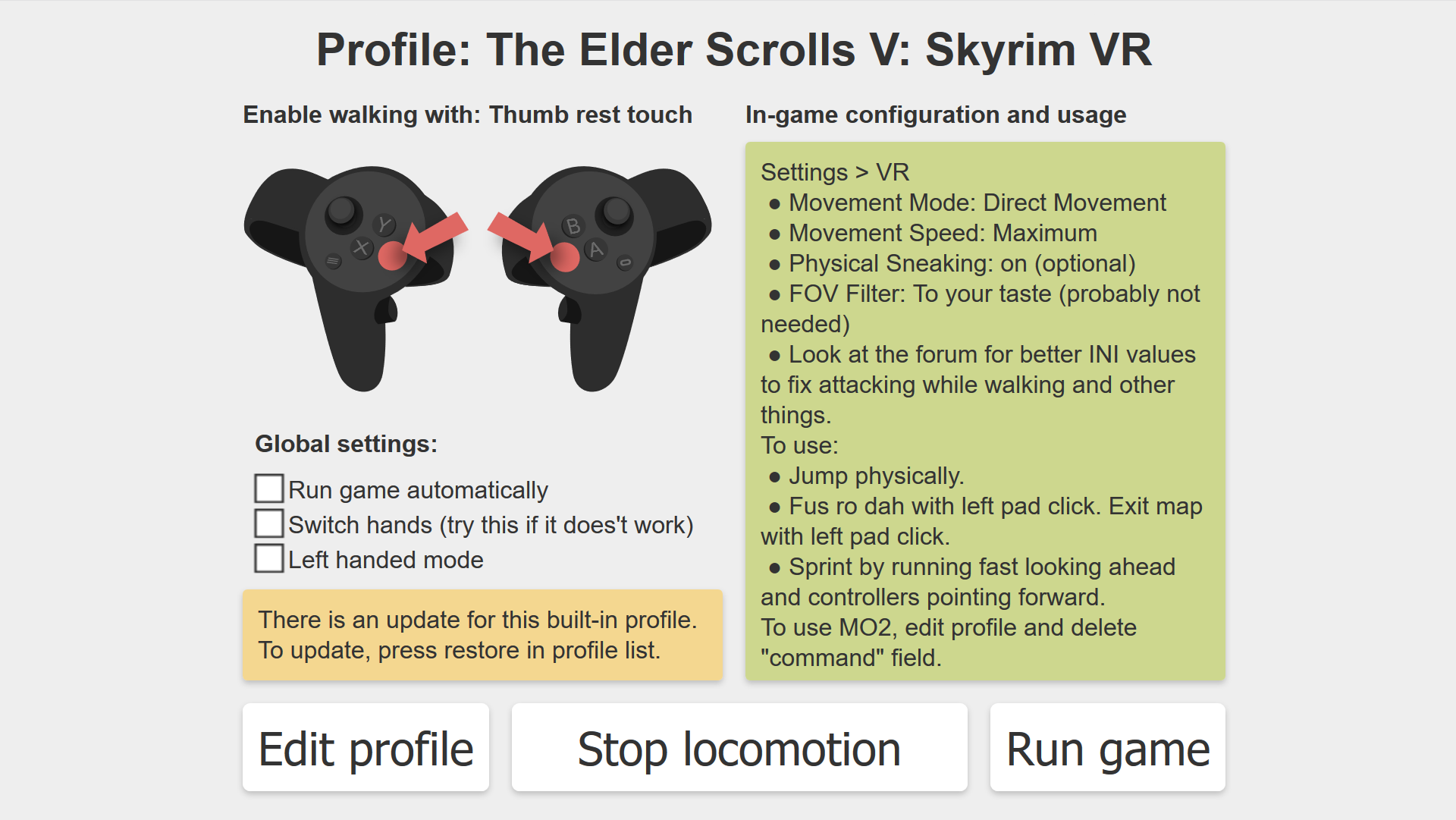
Bethesda just released an update to Skyrim VR where orientation mode is configurable, and both controller and HMD orientation modes work properly! We added a separate profile for it, defaulting to HMD orientation, but you can switch it to controller orientation if you prefer (for "combine" mode). Remember that the setting of both the game and the profile must match, otherwise there are unexpected results. NaLo is always oriented to the handles of both hands.

Additionally we're adding some more profiles.

Changes:
  • Added OrbusVR profile.
  • Added profiles for four Serious Sam games.
  • Added profile for Skyrim VR beta.
  • Tweaked Skyrim VR once more (except VIve's). Active zone is bigger because the original ini setting applies after dead zone, but NaLo does before.
  • Fixed defaults when creating a new profile for Vive or WMR.
  • Removed absolute speed limit of 8 m/s.

See previous post for known issues we're still solving.

As always, report problems in the community forum.

Added speed multiplier, fixed crouch jump, better UI, and many other improvements and fixes!

The Rift+WMR beta week lasted a little bit more than we intended, but here we are with the results! Among many other things, you'll no longer jump after crouching, you can adjust speed and sprint threshold and WMR users will have more control in Skyrim.

We hope you find this version to be much more intuitive, more stable and cooler. Let us know below!


Full list of changes:
  • Driver install script has been rewritten for robustness.
  • Adjusted parameters for Skyrim in all platforms.
  • Added VRChat on all platforms.
  • Added speed multiplier and sprint threshold.
  • Separated trackpad/joystick settings in two: original locomotion and emulation preferences.
  • Added images for activation buttons in the active locomotion screen.
  • Fixed more issues with unintended walking.
  • Fixed side switching (esp. important in WMR). It calibrates after walking a few times.
  • Fixed crouch jump. It calibrates after walking a few times.
  • Added a setting for those who prefer the old jump behaviour.
  • Made "passthrough pressing quickly" a little less quick. Renamed from "click passthrough".
  • Minor changes to several profiles.
  • UI improvements.
  • New screenshots.


The changes won't stop here, we are back full steam on bringing more features and more profiles this week! We're also making new videos that explain how to use Natural Locomotion. Click "follow" to be notified of updates.

Known issues:
  • Fallout 4 VR is broken in Oculus Rift.
  • If you close the app without clicking "stop", some buttons remain muted until you restart SteamVR.
  • Vive Pro users need to switch controllers, and to use "controller orientation" instead of "Skyrim".
  • The demo doesn't have any of the fixes of the last 3 weeks.
  • If the demo scene is started without headset tracking, floor is wrong in Vive and Rift uses fall to the infinite void.


As always, report any issues in the community forum. The previous version is temporarily available in the betas tab as "previous_version".


More WMR improvements and fixes! New Skyrim profile for WMR.

Motion sensitivity has been better calibrated for walking and jumping with Windows Mixed Reality. Settings getting reset has been fixed. A new profile for Skyrim for WMR has the following scheme:
  • Walk with grips. Shout with left joystick click (instead of SteamVR overlay).
  • Go back from menus, etc, with the left grip by pressing it quickly.
  • All touchpads and all joysticks work like they did originally.


The new quick press button passthrough feature works for all headsets, but no other built-in profile is using it right now.

Known issues for WMR:
  • If you press the grips while the controllers were flying due to lost tracking, the sides may be reversed. If that happens, just press a grip again when both controllers are tracking.