1. Crypt of the NecroDancer
  2. News

Crypt of the NecroDancer News

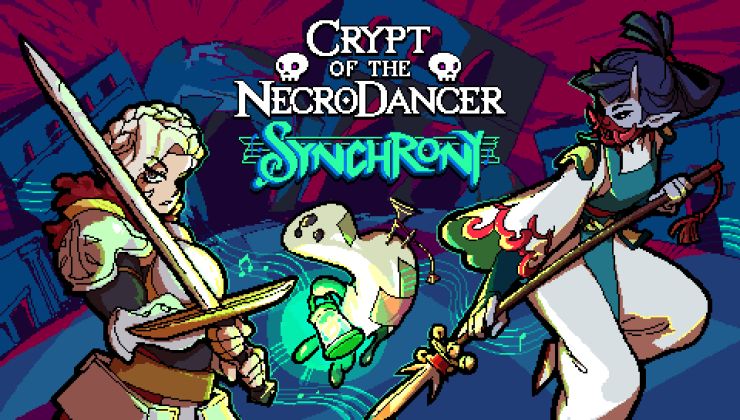
Crypt of the Necrodancer: SYNCHRONY DLC released into Early Access

A pleasant surprise for Crypt of the Necrodancer fans! SYNCHRONY, a new DLC for Necrodancer, released today into early access.

Read the full article here: https://www.gamingonlinux.com/2022/08/crypt-of-the-necrodancer-synchrony-dlc-released-into-early-access

Crypt Of The NecroDancer's developers just surprise announced a successor

The developers of Crypt Of The NecroDancer just sneakily announced a followup. It's called Rift Of The NecroDancer, and it's a "standalone rhythm game in the NecroDancer universe." You can watch its surprise reveal below, at the end of the trailer for the newly released Synchrony DLC for Crypt Of The NecroDancer.


Read more

NecroDancer SYNCHRONY DLC Available Now! - Update v3.1.0

[h2]RE-ANIMATE!!![/h2]

The Crypt has been silent for 5 years, but now the NecroDancer is back from the dead with a huge new DLC! SYNCHRONY adds online multiplayer (co-op and vs), three new characters, full mod support (& built-in mod portal), new items, enemies, & more! Let's take a look!

[previewyoutube][/previewyoutube]

https://store.steampowered.com/app/2094810/Crypt_of_the_NecroDancer_SYNCHRONY/

New DLC - Crypt of the NecroDancer: SYNCHRONY!


[h2]New Characters[/h2]
[h3]Klarinetta[/h3]
  • Wields the Zweihänder, a heavy sword that occupies a tile diagonally adjacent to her.
  • The Zweihänder follows Klarinetta's movement, striking any enemies in its way.
  • Diagonal movement buttons swing the Zweihänder around in a quarter-circle or half-circle, attacking enemies on several tiles at once.
    • Rotating the sword takes a full beat and causes Klarinetta to stand still momentarily.
  • When held in place, the Zweihänder acts as a barrier against enemies, preventing them from walking into the tile it occupies.

[h3]Chaunter[/h3]
  • A frail, ghostly being who with only half a heart, which cannot be increased by any means.
  • Wields the Lantern, which has the range of a dagger and provides a small amount of light.
  • Striking enemies with the Lantern gradually takes over their soul, allowing Chaunter to possess them after dealing enough damage!
  • Possessing an enemy lets Chaunter take full control, copying their health, damage and abilities
  • All enemy abilities are mapped to the action and spell slots.
    • For example, a possessed Red Dragon breathes fire using the two spell buttons.
  • Slow enemies such as Skeletons or Golems can move quickly while possessed.
    • Unlike fast enemies or Chaunter itself, slow enemies are allowed to wield weapons, overriding their usual attack!
    • Attacking, digging or using items forces them to stand still for a few beats.
  • When losing all hearts while transformed into an enemy, Chaunter reverts back to its usual form.
  • Control of an enemy cannot be kept indefinitely - a countdown of 24 beats starts ticking as soon as Chaunter takes possession.
    • Once the timer runs out, the possessed enemy starts taking damage, eventually forcing Chaunter back into its base form.
    • This can also be done manually by performing the 'Eject' action (Left+Right).

[h3]Suzu[/h3]
  • Wields the Lance of Courage, a melee weapon that unleashes a rapid, powerful dash when killing an enemy!
    • All enemies in a straight line are killed instantly as Suzu dashes through them.
    • The dash attack is only stopped by walls and shielded enemies, letting Suzu travel many tiles in an instant.
    • Bounce traps redirect her dash, altering her attack trajectory and final position!
    • Suzu is fully invincible during her dash, protecting her from any enemies waiting at her destiation.

[h2]Online Multiplayer[/h2]
Play with up to 8 players at once in online co-op and versus modes!

[h3]Rollback Multiplayer Architecture[/h3]
  • Play with friends from around the world without perceptible input/audio/visual lag!
  • High-latency support: two-player sessions are playable up to 300 milliseconds of latency.

[h3]In-game lobby browser and lobby visibility settings[/h3]
  • Includes public, friends-only, and private lobbies
  • Steam multiplayer integration for creating and joining lobbies - no port forwarding needed.
  • Optional support for direct IP connections and LAN play.
  • Headless dedicated server to allow hosting persistent lobbies and tournament matches.

[h3]Spectator Mode[/h3]
  • Spectate any individual player, changing targets at any time.
  • 'Spectate everyone' mode, splitting the HUD and zooming out the game view to see all players at once.
  • Automatic spectator view upon death or after entering stairs while waiting for other players to finish the level.
  • Ability to return to the level after entering the stairs to rejoin players instead of waiting.

[h3]Late joining and rejoining support for online sessions[/h3]
  • Disconnecting automatically enters spectator mode, allowing the player to jump back into the game after reconnecting.
  • Health bars and name plates for other players in online sessions and spectator mode.
  • In-game text chat with various scaling and visibility options.
  • Seamless hosting: an ongoing run can be opened up into a multiplayer session at any time via the 'Host online game' menu option.
    • Multiplayer save & quit restored sessions can be re-opened to the network, allowing other players to rejoin.
  • Replays and cutscenes can be watched together online, with the host player having access to the playback controls.
  • Per-player resource packs (Workshop mods):
    • Each player can load their own individual set of resource packs, independently of the host or other players.
    • The player character's appearance can be customized freely by choosing skins from any installed mod.
    • Support for custom beatmaps can be enabled by the host player, allowing players to move at different speeds.

[h3]Hybrid online and local co-op support[/h3]
  • Up to 4 local players can play together, including in online sessions.

[h3]DLC Cross-Play Support[/h3]
  • DLC-only modes, characters, items, enemies and Zone 5 are disabled while the DLC is inactive.
  • Players without the AMPLIFIED DLC can connect to lobbies hosted in non-AMPLIFIED mode.
  • AMPLIFIED players can join non-AMPLIFIED lobbies, automatically turning off DLC content in the process.
  • Online multiplayer is available to all owners of the Synchrony DLC, even if the new gameplay content is disabled.
  • Cross-platform multiplayer between Windows, macOS and Linux.
  • Networking performance features:
    • Desync detection, automatically resynchronizing players in case of a game state difference.
    • Dynamic input reprioritization, limiting the impact of any one player's lag spikes on other players in the session.
    • Hybrid peer-to-peer and server-client network code, reducing latency in cross-region multiplayer sessions.
    • Noise control system to gradually lower the volume of any repetitive player-made sounds.

[h2]New Items[/h2]
[h3]Shield Slot[/h3]
  • Faces in the wielder's movement direction and protects them against damage from that direction.
  • Wooden Shield: Protects against one hit before breaking.
  • Titanium Shield: Protects against two hits before breaking.
  • Heavy Shield: Protects against three hits before breaking, and also grants knockback immunity while active.
  • Obsidian Shield: Shields 1, 2 or 3 hits depending on the wielder's coin multiplier.
  • Shield of Strength: Protects against one hit before breaking. Grants +1 damage while unbroken!
  • Reflective Shield: Protects against one hit before breaking, deflecting damage back to the enemy in the process.
  • Shield of Shove: Protects against one hit before breaking, and allows the wielder to shove adjacent enemies.

[h3]Onyx Weapons[/h3]
  • Deals greatly increased damage on consecutive hits, but loses the damage bonus upon moving.
  • Most effective on weapons that hit a broad range of tiles, less so on weapons with dash attacks

[h3]Trident[/h3]
  • Attacks like a broadsword at a higher range, hitting a row of three tiles, or like a dagger at close range.
  • Comes in all common weapon flavors: Basic, Blood, Gold, Titanium, Glass, Obsidian and Onyx!
  • Throwable! When thrown, three lanes are hit at once instead of just one, clearing out a much wider area!

[h3]Throwing Charm[/h3]
  • Allows any weapon to be thrown like a Dagger!
  • Once per level: throwing a weapon causes it to return to the wielder, dealing damage on the way back.
  • Stepping sideways after throwing slants the return trajectory, allowing different tiles to be hit!

[h3]Berserk Spell[/h3]
  • Starts a berserking charge on the next move, killing any enemies unfortunate enough to stand in the way!
  • Stops upon colliding with a wall or any other obstacle.
  • The Berserk state grants immunity to incoming attacks, but removes the ability to change directions until it ends.
  • Greater Berserk fills the caster with even more blind rage, additionally killing enemies on adjacent tiles!

[h3]Dash Spell[/h3]
  • Turns the next move into a long-range dashing attack, dealing 4 hearts of damage to any enemies along its path!
  • If an enemy is killed by the dash, the caster will pass right through.
  • Greater Dash increases the range and damage of the dashing attack!

[h3]Charm Spell[/h3]
  • Charm nearby monsters to turn them into temporary allies!
  • Allied monsters will seek out and attack other enemies until the effect wears off.
  • Bumping into an allied monster pushes it out of the way, dealing damage when squished against an obstacle.
  • Greater Charm's effect does not wear off, turning monsters into allies for the entire duration of the floor!

[h3]Scroll of Duplication[/h3]
  • Drops from an activated Shrine of Duplication.
  • Duplicates all items, enemies, crates and chests in 3x3 range around the user.
  • Enemies, crates and chests are only duplicated if there is space behind them.
  • Shop items retain their price tags when duplicated.
  • The Scroll of Duplication itself cannot be duplicated.

[h2]New Enemies[/h2]
[h3]Thief[/h3]
  • Runs towards the player and tries to steal their items! Weapons and items in locked slots are not stolen.
  • In co-op mode, the Thief takes turns trying to rob different players, and will dodge attacks from any player other than its target.
  • When two items are stolen successfully, the Thief laughs at their victims and quickly disappears.
  • When killed, it drops a random uncommon item, along with any potentially stolen goods.
  • The Thief has a low chance of spawning on any level but is slightly more common in co-op mode

[h3]Mannequin[/h3]
  • Created by the Shrine of Duplication - copies all equipment of the player who activates the shrine.
  • Mirrors the actions the player closest to it - movement, attacks, digging and even using items and spells!
  • Can pick up items and gold from the ground, which are dropped upon death.

[h3]Shock Monkey[/h3]
  • While grabbed, deals half a heart of damage to its struggling victim per hit!
  • Each hit also starts an electric arc that damages nearby enemies.
  • Stay away from water!

Stay tuned for more enemies to come during Early Access!
[h2]New Traps[/h2]
[h3]Dice Trap[/h3]
  • When stepped on, the Dice Trap spawns a number of completely random enemies from any zone, then disappears.

[h3]Automatic Spike Trap[/h3]
  • Alternates between extending and retracting each beat. Inflicts damage only while extended.

[h3]Floor Crack[/h3]
  • Guaranteed to spawn exactly once per zone, somewhere on a random level.
  • Creates a trapdoor upon being destroyed by a bomb.

[h3]Spiked Wall[/h3]
  • Inflicts damage to the player when dug with a shovel.
  • Spikes are only visible if the corresponding side of the wall is adjacent to a floor tile.
  • Revealed enemies take damage when moving into spiked wall tiles.

[h2]New Shrines[/h2]
[h3]Shrine of Duplication[/h3]
  • Spawns a Mannequin wielding copies of all items worn by the player who triggered the shrine.
  • The Mannequin mirrors all actions of the closest player!
  • Defeating the Mannequin will drop its items on the ground, granting a duplicate set of items for other players to pick up.
  • Can only be found in co-op mode.

[h3]Shrine of Binding[/h3]
  • When touched by two players at once, their souls are linked together for the rest of the run.
  • Linked players share one and the same inventory, health bar and coin multiplier.
  • If one player takes damage or dies, both players are affected!
  • In online multiplayer, linked players can always see each other, with the view expanding as needed to fit both players.
  • Can only be found in co-op mode.

[h3]Shrine of the Feast[/h3]
  • Activates upon eating two food items adjacent to the shrine, granting a choice between three items.
  • Cannot be interacted with directly.

[h3]Shrine of Fire[/h3]
  • Activates upon inflicting fire-type damage to the shrine, granting a choice between three items.
  • Cannot be interacted with directly.

[h2]Other Gameplay Features[/h2]
[h3]Pawnbroker Rework[/h3]
  • After two items have been sold to him, the Pawnbroker will present a selection of his finest wares at great prices!
  • He offers a choice between three items at a discount, of which only one can be chosen.
  • Selling more items causes him to re-roll his shop's contents, presenting a different choice of three items.
  • After purchasing an item, selling more equipment will not cause the shop items to reappear.
  • Selling enough items causes the Pawnbroker to present his Special Offer!

[h3]Equipment Sprites[/h3]
  • Displays all held and equipped items on the player character's sprite.
  • The visibility of equipment sprites can be controlled in the 'Change Skin' menu.
  • By default, equipment sprites are only visible on the default skin, and hidden when selecting a custom skin.

[h2]New Game Modes[/h2]
[h3]Versus Modes[/h3]
    Engage in combat with other players in Player versus Player modes!
  • Instead of going through the floors of the crypt together, use various items and strategies to defeat your opponents!
  • Arenas are procedurally generated, combining 2 zones into 1 floor!
  • As the game progresses, various events can happen on the arena. This includes shop travel runes spawning, everyone becoming confused, and... telemonkeys?!

[h3]Versus mode: Deathmatch (default)[/h3]
  • In this mode, the winner is the player who manages to get the most points, which are earned by defeating others.
  • Getting defeated by taking damage from enemies or floor hazards results is penalized by losing one point.
  • However, if the above happens shortly after taking damage from a player, that player will be considered the killer. In this case, there's no penalty and the other player gains a point normally.
  • Players respawn shortly after being defeated, so you can get back to the action quickly!
  • To view the list of players and their points, use the 'Toggle player list' hotkey ('Tab' by default, configurable in menu controls).
  • By default, a deathmatch consists of 3 rounds on different floors. However, this (and many other things) can be changed in the 'Custom rules' menu after entering Versus Mode!

[h3]Versus mode: Last One Dancing[/h3]
  • The winner is simply the player who manages to survive the longest - no complicated rules here!
  • To enable this mode, change the game mode in the 'Custom rules' menu.

[h3]Team Up With Other Players[/h3]
  • The modes above can also be played in teams, which can be enabled within 'Custom rules'!
  • Players can either be assigned to teams automatically or choose their teams manually.

[h3]Use never-before-seen items, which appear exclusively in Versus[/h3]
  • Wind Tomes: push away nearby enemies and players! It may also be used to surprise your opponents with bombs...
  • Goblin Bomber Charm: makes you drop a lit bomb when defeated.
  • Ring of Gluttony: makes food heal you a bit more.
  • Ring of Whirlwind: casts a greater wind spell which pushes enemies away when you get hit and also prevents the damage, then shatters.
  • Essences: these mysterious items allow you to enchant your weapon to a specific material!
  • Electricity Tomes: temporarily grants electric attack powers (note: this item will only appear if the AMPLIFIED DLC is enabled)

[h3]Versus-Specific Item Tweaks[/h3]
Update v3.03

Crypt of the NecroDancer v3.0.3 is now available! We'd like to give a special thank you to community member Elyscape who provided extensive support for the MacOS ARM64 build. NecroDancer v3.0.3 should now run correctly on Apple M1 devices!

[h2]New features and changes[/h2]

[h3]Additions[/h3]
  • Added support for playing the Daily Challenge in co-op mode
  • Added the ability to manually create a beatmap by tapping to the rhythm when importing custom music
  • Added support for changing the skin of Mary's Lamb via workshop mods
  • Added keyboard shortcut to open a dungeon in the level editor (defaults to Ctrl+O, can be remapped in the options)

[h3]Changes[/h3]
  • Changed the minimap to display players as blinking blue pixels
  • Changed the Conjurer's and Transmogrifier's price overflow behavior to be controlled by a quirk
  • Changed Tempo's ability to get infinite countdown resets from an unaffordable chest to be controlled by a quirk


[h2]General Bugfixes[/h2]

[h3]Stability[/h3]
  • Fixed MacOS build not starting up on Apple Silicon devices when running in native ARM64 mode
    • Huge thanks to Elyscape for their help with this fix!

[h3]Steam Workshop & Modding[/h3]
  • Fixed custom music failing to be imported on Windows for users with special characters in their username
  • Fixed some skins rendering incorrectly while standing on a wire
  • Fixed Nocturna skins displaying her human head sprite in Bat Form
  • Fixed modded character skins applying incorrectly when only the head spritesheet or only the body spritesheet is replaced

[h3]Level Editor[/h3]
  • Fixed shop floor not being available in the level editor
  • Fixed level editor spawning additional characters in player-locked levels
  • Fixed level editor prompting about unsaved changes when loading a dungeon, even if no unsaved changes are present
  • Fixed Pre-Angered Pawnbroker being invincible when placed in the editor

[h3]Input[/h3]
  • Fixed certain keyboard keys being incorrectly recognized as alphabetical keys on Windows


[h2]Gameplay Fixes[/h2]

[h3]Enemies[/h3]
  • Fixed goblin sentries repeatedly screaming when waking up while out of sight or frozen
  • Fixed clones using the Cadence clone sprite, regardless of the character being played
  • Fixed Hard Mode Sarcophagi sometimes spawning as lords
  • Fixed Shop Wall Mimics leaving floating torches behind
  • Fixed Sleeping Gargoyle Mimics not being killable by piercing damage
  • Fixed Moles spawning on tar tiles
  • Fixed phasing Moles getting stuck behind walls in Randomizer Mode
  • Fixed Leprechaun taking longer than intended to disappear
  • Fixed spirits sometimes spawning inside other enemies when the player gains telepathy
  • Fixed Super Secret Shopkeeper and Lobby NPCs being vulnerable to weapon damage

[h3]Bosses[/h3]
  • Fixed Coral Riff tentacles moving too quickly in Randomizer Mode
  • Fixed knockback sometimes incorrectly applying to Deep Blues after teleporting
  • Fixed Devils summoned by Fortissimole moving too quickly
  • Fixed Fortissimole acting one beat too early after the player enters his arena

[h3]Characters[/h3]
  • Fixed Dove's bombs dealing damage to enemies instead of teleporting them
  • Fixed gold picked up by Monk/Coda not being added to the run's total score
  • Fixed Crown of Greed working for Monk/Coda
  • Fixed Skulls dropping a gold coin for Monk/Coda
  • Fixed 'Previous Position' quirk not accurately replicating 2.59's behavior for Bard
  • Fixed Nocturna's Bat Form sprite being cut off after transforming in water

[h3]Items[/h3]
  • Fixed Fireball spell always knocking enemies to the right, instead of away from the player
  • Fixed Conjurer and Transmogrifier refusing to spawn items on top of their transaction panels
  • Fixed pushback from unaffordable items causing the No Return Tile to deal damage
  • Fixed invisible lingering collision box when stepping on the No Return tile while wearing a Crown of Teleportation
  • Fixed possible desync when 'Spell Prevpos' quirk is enabled

[h3]Traps[/h3]
  • Fixed some Tempo Up Traps on King Conga being replaced with Confusion Traps
  • Fixed Hot Coals not dealing damage to players stepping onto the tile via a Bounce Trap

[h3]Lobby[/h3]
  • Fixed lobby animations sometimes being sped up after increasing replay playback speed

[h3]Visual Fixes[/h3]
  • Fixed Mystery Mode attempting to conceal the sprite of the No Return tile
  • Fixed revealed enemies leaving behind trails of red dots on dark tiles on the minimap
  • Fixed lobby walls having a different color on the minimap than in 2.59
  • Fixed enemies on stage tiles not appearing on the minimap
  • Fixed health bar sometimes showing filled hearts on the death screen

Update v3.0.2

Crypt of the NecroDancer v3.0.2 is now available! Localizations return in this update,

[h2]New Features and Changes[/h2]

[h3]Localizations are back! Thanks for your patience while we worked on these.[/h3]
  • Added automatic language detection based on Steam client preference
  • Added translations for the following languages:
    • German
    • French
    • Italian
    • Spanish
    • Japanese
    • Portuguese
    • Russian
    • Korean
    • Simplified Chinese
    • Traditional Chinese

[h3]Translation Mods[/h3]
  • Added option to create a new language mod with a translation template via the language selection menu
  • Added support for loading translations from the Steam Workshop
    • Translation CSV files should be placed in a `languages` subfolder inside the mod's root directory
  • Added support for layering language modifications on top of existing translations
    • For this to work, mods should name their translation files according to the language ISO-code (e.g. `languages/de_DE.csv`)
    • Supported language codes are: `en_US`, `de_DE`, `fr_FR`, `it_IT`, `es_ES`, `ja_JP`, `pt_BR`, `ru_RU`, `ko_KR`, `zh_CN`, `zh_TW`
    • In addition, if a mod provides a file called `languages/all.csv`, text strings can be injected across all languages
  • Added support for overriding English strings in language mods (via `languages/en_US.csv`)
  • Added support for overriding text strings across all languages in mods (via `languages/all.csv`)

[h3]Point Symmetric Co-op HUD Mode[/h3]
  • Player 2's HUD is mirrored horizontally and vertically, allowing the icons and text to be displayed at a larger scale
  • This is enabled by default on the Steam Deck to improve readability

[h3]Skin Mods Support[/h3]
  • Added an advanced setting to enable selecting skins for any character in the 'Change Skin' menu
  • Added support for selecting non-AMPLIFIED character skins from mods while AMPLIFIED content is enabled
    • When standing on a wire, the character is displayed as normal instead of displaying an electricity effect
    • When Quartz or Heavy Glass armor is equipped, the character sprite is shown without the armor

[h3]UI and HUD Additions[/h3]
  • Added pause menu indicator and run introduction text to indicate that Custom Rules or `necrodancer.xml` mods are active
  • Added compatibility with "Words to Arrows" and other workshop mods that tweak the key combo HUD text
  • Added an option to show default HUD text for each input map to the 'Reassign controls' menu

[h3]Calibration Additions[/h3]
  • Added auto-calibration for audio latency, increasing/decreasing effective latency to match early/late beats
  • Added a grace period of 50 milliseconds immediately following a valid input
    • During this time, missed beats are silently ignored instead of causing the coin multiplier to be lost

[h3]Level Editor[/h3]
  • Added the ability to quickly switch to the level editor's category list and dismiss searches by right clicking the object panel

[h3]New Launch Parameters for Steam Cloud and Native Controller Support[/h3]
  • Added launch parameter `--no-steam-cloud` to disable Steam Cloud synchronization
  • Added launch parameter `--no-steam-input` to disable Steam Input and enable native controller support
    • This should restore compatibility with Dancepads and other input devices not recognized by Steam Input
    • Some controller models may use non-standard button layouts, requiring manual configuration via the 'Reassign controls' menu
    • In addition to passing this launch option, it may be required to disable Steam Input Integration in the properties of Crypt of the NecroDancer within the Steam library

[h3]Changes[/h3]
  • Changed skin loader to automatically apply modded skins to all characters, instead of just the currently active character
  • Changed level editor categorization to show wall torches in the same category as walls, instead of items
  • Changed replay controls to reappear when pressing a valid hotkey while viewing a replay
  • Changed controller auto-detection to more eagerly switch devices without having to use the 'Reassign Controls' menu
  • Changed travel runes to automatically generate secret shops in the level editor when an odd number of runes is placed
  • Changed the default multi-key combo delay from 50ms to 40ms to reduce the likelihood of late missed beats

[h2]General Bugfixes[/h2]
[h3]Stability[/h3]
  • Fixed error during item generation when restoring very long deathless runs
  • Fixed error when frame-perfectly pressing >4 keys at once while rebinding a key

[h3]Achievements & Leaderboards[/h3]
  • Fixed achievements for Deathless Mode, Story Mode and All-Characters Mode not unlocking
    • This fix is retroactive! Existing leaderboard entries from 3.0.0 or 3.0.1 for these modes will be honored and cause their respective achievements to be unlocked
  • Fixed leaderboard submissions being enabled while the 'Quirks' feature pack is disabled
  • Fixed leaderboard submissions being disabled by explicitly setting a custom rule to its default value

[h3]Steam Workshop & Modding[/h3]
  • Fixed some Spike-Chunsoft skins not being selectable in the 'Change Skin' menu
  • Fixed direct modifications to the `necrodancer.xml` file affecting gameplay
  • Fixed translation files failing to load if they contain CRLF line endings or a UTF-8 Byte Order Mark
  • Fixed non-functioning 'Open directory' option being shown for packaged workshop mods

[h3]Input[/h3]
  • Fixed unpause countdown and latency calibration click track being inaudible on low sound volumes

[h3]Level Editor[/h3]
  • Fixed level editor sometimes turning unchanged levels into void levels when opening and saving a dungeon
  • Fixed level editor failing to save dungeons with special characters in their name
  • Fixed level editor displaying a "Press Enter to select character for player 2" prompt in local co-op
  • Fixed level editor resetting character choices for local co-op players
  • Fixed level editor not preserving the boundaries of secret shops in generated levels
  • Fixed playable characters not being placeable in the level editor
  • Fixed Shield Generators not being functional when manually placed in the level editor
  • Fixed Fortissimole not captivating his skeletal audience when manually placed in the level editor
  • Fixed Double Heart Transplant being listed in the editor, causing confusion due to its sprite
  • Fixed Conga Lines not dancing in sync when manually placed in the level editor
  • Fixed arena rooms in custom levels being cut off at the bottom after clearing the arena fight

[h2]Gameplay fixes[/h2]
[h3]Enemies[/h3]
  • Fixed Monkeys appearing in Zone 4 for Aria and Coda
  • Fixed Sarcophagi in Hard Mode and Practice Mode not being delayed when failing to spawn an enemy
  • Fixed Wired Zombies being immune to bombs and the Rat Familiar
  • Fixed Armadillos and Minotaurs recovering from their post-charge stun while frozen
  • Fixed Pixies inflicting damage to the player when knocked away by Ring of War
  • Fixed Electric Mages firing electric orbs while going down trapdoors
  • Fixed Beetles not unshelling immediately when spawning adjacent to a player
  • Fixed enemies sometimes attempting to track players in the secret shop for one beat
  • Fixed Goblin Sentries being excessively noisy when playing co-op with different character rhythms

[h3]Minibosses[/h3]
  • Fixed Banshees not deafening the player when damaged by a Rat Familiar
  • Fixed Hard Mode minibosses not being affected by Ring of Peace and Ring of War

[h3]Bosses[/h3]
  • Fixed promoted Deep Blues Queens sometimes dealing 0 damage in Randomizer Mode
  • Fixed Fortissimole's summoned Liches immediately tracking the player
  • Fixed Death Metal sometimes failing to play music if AMPLIFIED content is not installed and the FamilyJules7x soundtrack is active
  • Fixed minibosses spawned in Cadence's penultimate boss fight sometimes acting twice in a row
  • Fixed Aria's final boss being stunned for one beat when hit with a Ring of Frost or Frost Dagger
  • Fixed Nocturna's penultimate boss sometimes summoning minibosses after being defeated
  • Fixed the exit room of Nocturna's penultimate boss having exposed void tiles
  • Fixed the shield of Nocturna's penultimate boss not inflicting retaliation damage when hit by a bomb or Rat Familiar
  • Fixed Gold Weapons carrying their damage boost across level transitions

[h3]Characters[/h3]
  • Fixed Coda dying when taking 'Back to Lobby' stairs in Training Mode
  • Fixed Dorian's Boots of Leaping being toggled on in the character selection room of All Characters runs
  • Fixed Dove being chased down by bats after tickling them twice in a row
  • Fixed Dove's coin multiplier not increasing when tickling the same enemy multiple times
  • Fixed Eli finding bombs inside of crates when Ring of Luck or Lucky Charm is equipped
  • Fixed Mary's lamb getting hit by Evil Eyes from a distance
  • Fixed Mary's lamb not causing Fortissimole to pop out of the ground when diagonally adjacent
  • Fixed Mary's lamb not showing up in the kill-perspective post-death replay when dying to Mary's Curse
  • Fixed Monk's/Coda's forced gold drop from boss minions not being cleared out by explosions in some cases
  • Fixed Nocturna being invisible while inside of a wall in Bat Form if Phasing Mode is enabled
  • Fixed Nocturna getting healed by Ring of Regeneration in Bat Form

[h3]Items[/h3]
  • Fixed Dagger of Phasing not allowing attacks from inside walls
  • Fixed players with a Shovel of Courage not giving way to other players trying to move onto their previous tile in local co-op
  • Fixed Glass Shards not counting as a base shovel/dagger for Scroll of Need
  • Fixed Heart Transplant not granting protection against missed beats from standing still when its effect ends
  • Fixed player-placed bombs failing to damage non-aggro'd enemies when when quirks are disabled
  • Fixed Fireball Spell hitting the same enemy twice if it teleports from the right side of the attack range into the left side
  • Fixed War Drum not causing the player to yell on their next attack
  • Fixed Ninja Mask not granting immunity to traps

[h3]Shrines[/h3]
  • Fixed Shrine of Rhythm inflicting damage upon taking a trapdoor
  • Fixed Shrine of Darkness not removing Nightmare shadows
  • Fixed Wind Gargoyles and Gargoyles Mimics not counting towards the Shrine of Sacrifice
  • Fixed Shrine of Darkness affecting the character selection room in All Characters Mode
  • Fixed Shrine of Uncertainty not causing the previous weapon to be holstered if possible
  • Fixed players not being teleported back into the Shriner's room when destroying the shrines and trying to flee
  • Fixed 'No Return' square incorrectly dealing damage when the 'Spell Prevpos' quirk is active

[h3]Traps[/h3]
  • Fixed Leprechaun dropping Lucky Charm when killed by a bomb trap
  • Fixed Spike Traps not killing Devils or 5-health Leprechauns immediately
  • Fixed Hard Mode Sarcophagi spawning enemies on traps

[h3]Lobby[/h3]
  • Fixed Single-Zones bonus chests spawning before the corresponding lobby upgrade is unlocked
  • Fixed locked doors consuming keys intended for lobby NPC cages

[h3]Visual Fixes[/h3]
  • Fixed Nocturna's final boss being affected by Mystery Mode
  • Fixed Nocturna's story bosses displaying incorrect sprites in Mystery Mode
  • Fixed holster not displaying a flyaway when automatically swapping the weapon
  • Fixed Goblins not always facing the correct direction
  • Fixed off-screen enemies leaving a trail of red dots when telepathy is active
  • Fixed visual orientation of Mushrooms and Waterballs
  • Fixed minimap not updating while in a secret shop
  • Fixed Monocle item previews not hovering independently of each other

[h2]Known Issues[/h2]
  • On Windows, creating a Workshop Mod or using the "Open Directory" option does not launch the File Explorer.
    • The directories are still created correctly and can be accessed by manually browsing the game's local files.